You copied a command off a forum. It worked. But it ended with this weird little tail: > /dev/null 2>&1. What is that? Is it deleting something? Is it sending your data somewhere? Should you be worried?
Short answer: /dev/null is a special file on Linux, macOS and other Unix-style systems that throws away everything you write to it and gives back nothing when you read from it. It's the computer's official trash chute. Programmers send output there when they want a command to run quietly, and hackers say "send it to /dev/null" when they mean "ignore it forever."
So how can a file eat data without filling up? Why does it have such a strange name? And what does that 2>&1 business actually do? Here's what /dev/null is, how to use it, and how it became one of the internet's favorite insults.
What Is /dev/null?
Break the name into two parts. /dev is a folder that holds device files, which are special files that stand in for hardware or kernel features. Your disks, your terminal and your random number generator all show up there as files. null means nothing. So /dev/null is the "nothing" device.
It behaves like this:
- Write to it and the data disappears. The write still reports success, so the program doing the writing is happy.
- Read from it and you get nothing at all. It returns "end of file" immediately.
- It never fills up. There's no disk behind it. Nothing is stored, so there's nothing to fill.
You can see all three behaviors in a few seconds of terminal time:
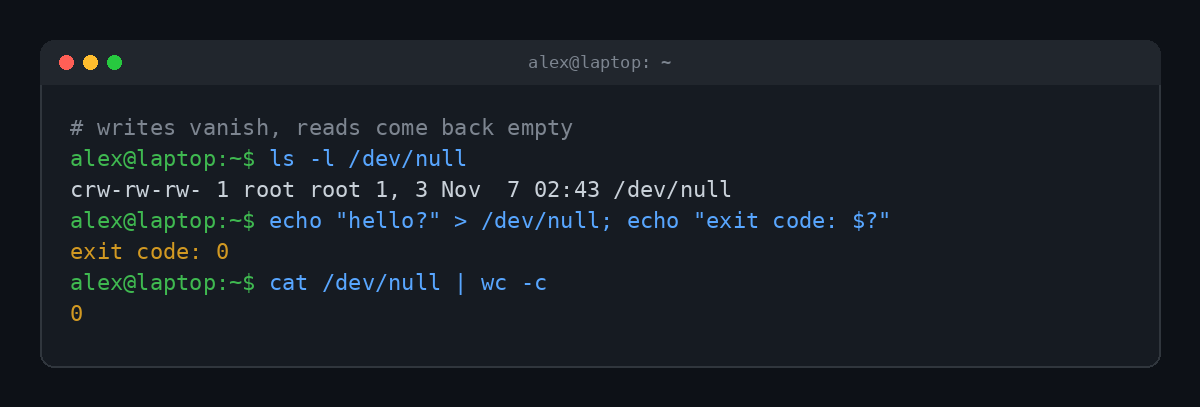
A few details in that listing are worth decoding. The c at the front means it's a character device, not a regular file. Where a normal file would show its size, you see 1, 3 instead. Those are the device numbers the Linux kernel uses to know which driver handles it (the "memory devices" driver, slot 3). And the permissions are rw-rw-rw-, so every user on the system can read and write it.
That last part is unusual. We spent a whole post explaining why world-writable permissions are usually a bad idea. /dev/null is the one place it makes perfect sense. Anyone should be able to throw things away, and there's nothing in there to steal.
Where Did /dev/null Come From?
/dev/null is about as old as Unix itself. It shows up in the Unix Programmer's Manual in the early 1970s. Fun detail: the Fourth Edition manual from November 1973 describes it as an empty regular file, and by the Fifth Edition in June 1974 it's documented as a device that works the way it does today.
The idea is older than Unix, though. Other systems had their own data sinks under different names:
| System | The "nothing" device |
|---|---|
| Linux, macOS, BSD | /dev/null |
| DOS and Windows Command Prompt | NUL |
| Windows PowerShell | $null (or piping to Out-Null) |
| OpenVMS | NL: |
| AmigaOS | NIL: |
| IBM mainframes (JCL) | DD DUMMY |
So when a Windows guide tells you to run something with > NUL, it's the same trick wearing a different hat.
What Is /dev/null Used For?
To understand why people use /dev/null constantly, you need one more concept. Every command in a terminal has two output channels:
- stdout (standard output, stream number 1): the normal results.
- stderr (standard error, stream number 2): error messages and warnings.
Both usually print to your screen, mixed together. Redirection lets you send each one somewhere else. And the most popular "somewhere else" is nowhere.
Hiding error messages with 2>/dev/null
This is the classic. Say you search the /etc folder for files whose names start with "shadow" as a regular user. A bunch of folders are off limits, and find complains about every single one:
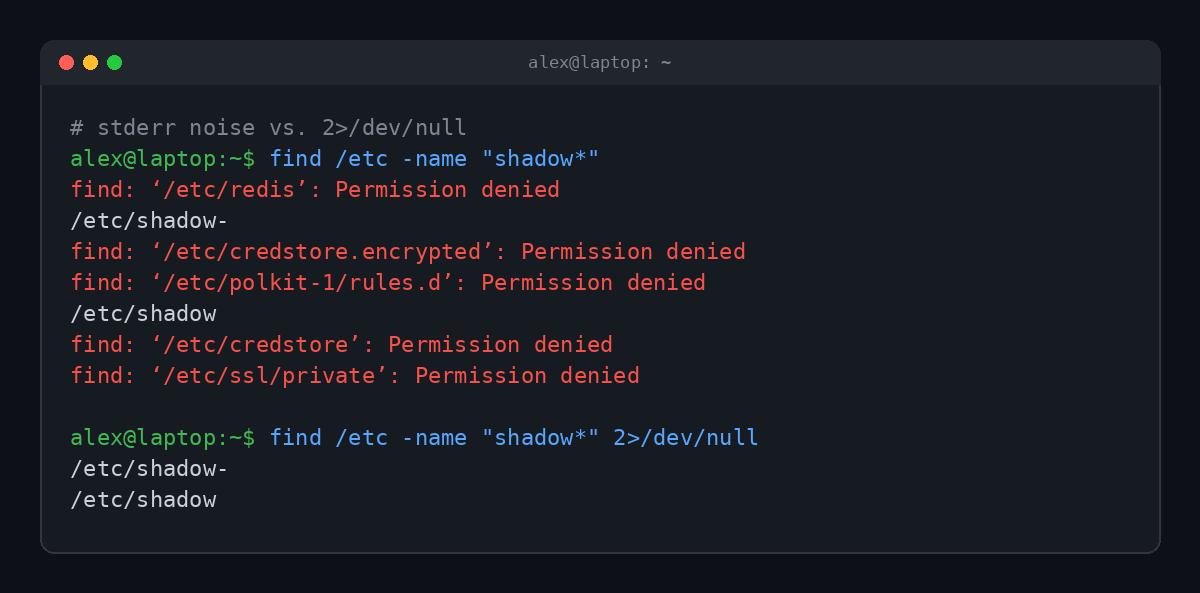
The 2> means "redirect stream 2," which is stderr. Point it at /dev/null and the noise vanishes while the two results you wanted stay on screen. On a real system searching from /, the difference is even bigger. In our test, the full-disk version of that search threw 577 permission errors.
(Note that the files were found but not opened. Seeing that /etc/shadow exists doesn't let you read the password hashes inside it. For that you'd need sudo.)
Silencing everything with > /dev/null 2>&1
Now the mystery tail from the top of this post. It has two parts:
> /dev/nullsends stdout to the void.2>&1says "send stderr wherever stdout is currently going." Since stdout is going to /dev/null, so does stderr.
Result: total silence. You'll see this all over scripts and scheduled jobs. For example, a cron job (a command your system runs on a schedule) will email its output to the account owner by default. Ending the line with > /dev/null 2>&1 stops a backup script from sending you the same "all good" email every night.
Here's the catch that trips everyone up: order matters. The shell reads redirections left to right.
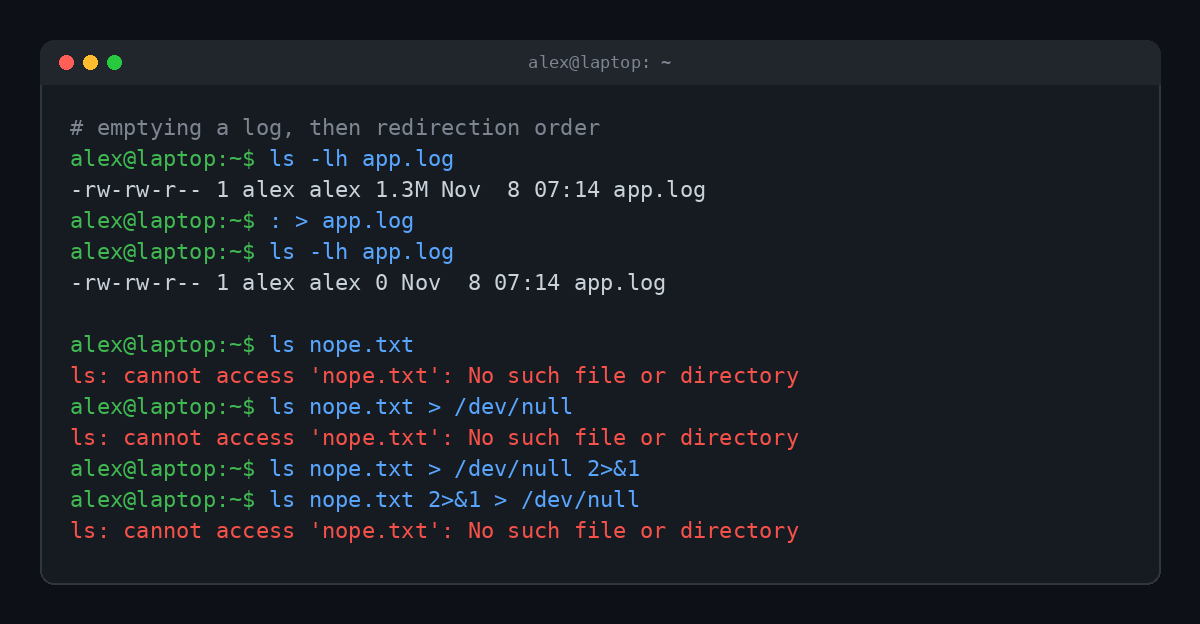
Look at the last two lines. > /dev/null 2>&1 is silent. 2>&1 > /dev/null still shows the error. In the second version, stderr gets pointed at the screen (where stdout was going at that moment) before stdout gets moved to /dev/null. Stderr doesn't follow it. Same pieces, different order, different result.
Bash also has a shortcut, &> /dev/null, that does the same thing as the long form. It's handy in your own terminal, but it's a Bash feature. Simpler shells like dash (the default /bin/sh on Debian and Ubuntu) don't understand it, so scripts meant to run anywhere stick with the long version.
Other handy tricks
- Emptying a file without deleting it.
cat /dev/null > app.log(or just: > app.log, as in the screenshot above) shrinks a log to zero bytes while keeping the file, its permissions and any program still writing to it. - Giving a command empty input.
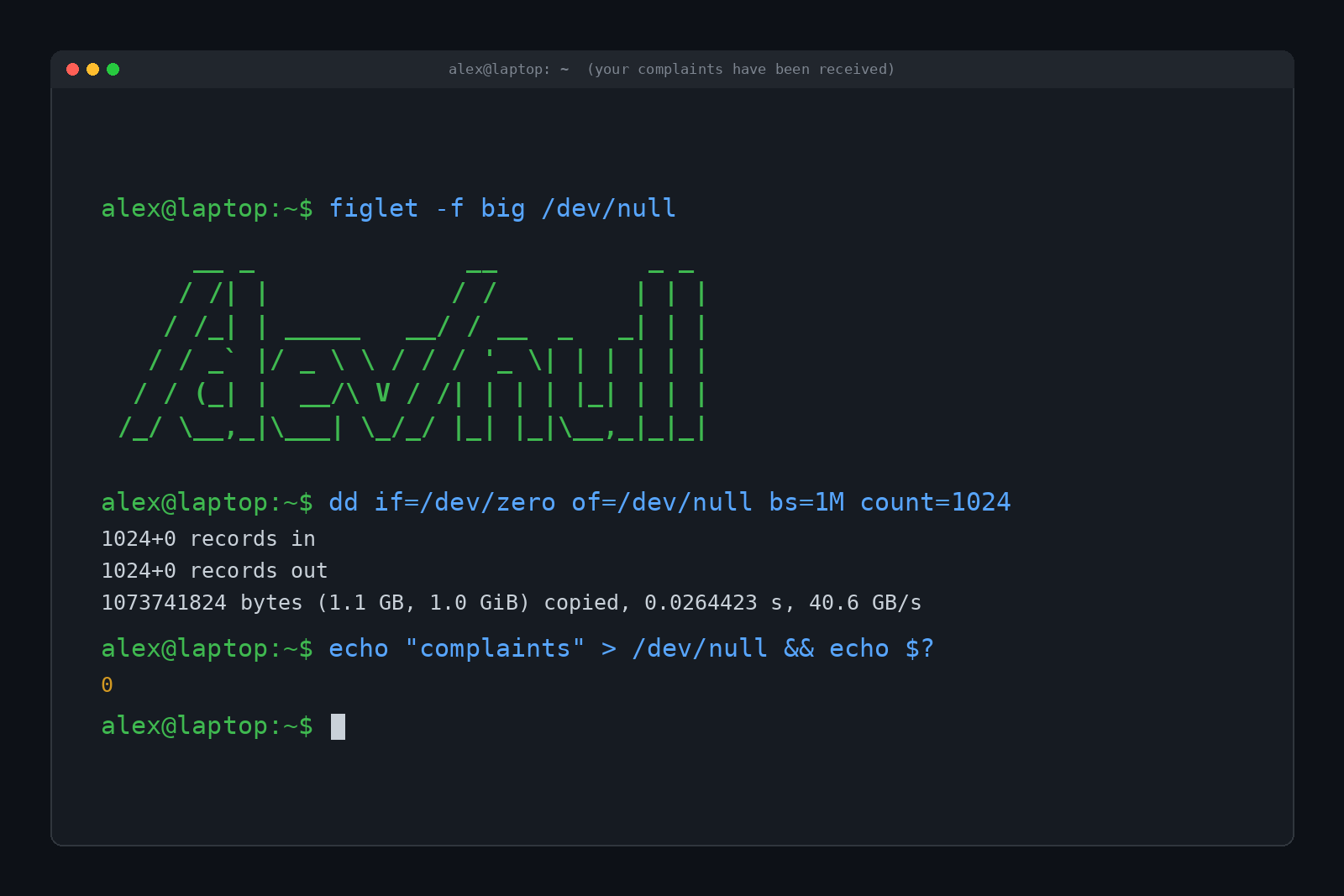
some-command < /dev/nullhands a program a blank input so it can't sit there waiting for you to type. - Testing speed without touching a disk. Copying data into /dev/null is a common way to measure how fast something can be read, since the destination costs nothing. The feature image at the top shows a full gigabyte of zeros vanishing into it in a fraction of a second.
- Checking whether something works without the output.
grep -qexists for this now, but plenty of old scripts run a command into /dev/null and only look at whether it succeeded.
Can /dev/null Fill Up or Break?
It can't fill up. There's no storage behind it. A long-running hacker joke is the fake system warning "/dev/null is 98% full, please delete some files." (Don't go looking for the files.)
It can break, though, in one specific way. /dev/null is a device file, and if someone with root access deletes it, the next program that writes to /dev/null just creates an ordinary file with that name. Suddenly your "trash chute" is a regular file quietly filling up with junk, and tools that read from it start getting garbage. It's rare, it usually takes a careless rm as root, and a reboot normally recreates the real device on modern Linux. But it's a good reason to never type sudo rm /dev/null, even as a joke.
/dev/null also has a couple of siblings worth knowing:
/dev/zerogives you endless zero bytes when you read it./dev/fullis the opposite of /dev/null. Every write fails with "No space left on device," which makes it great for testing how a program handles a full disk.
All of these are documented in the null man page on most systems, if you want to read the manual straight from the source.
/dev/null in Hacker Culture
Because /dev/null means "gone forever, no questions asked," it escaped the terminal and became slang. The Jargon File, the classic dictionary of hacker language, defines it as a notional black hole in any information space. A post might end with something like "praise to me, flames to /dev/null," meaning angry replies will be ignored.
Some of the greatest hits:
- "Send complaints to /dev/null." Translation: don't bother.
- "Redirect yourself to /dev/null." A nerdy way of saying "go away."
- The bit bucket. An older nickname for the same idea. Lost data "went to the bit bucket."
- Dave Null. A fictional person whose email address, conveniently, never replies.
The Wikipedia article on null devices collects more of these, including the iPhone Dev Team telling people to send donations to /dev/null (meaning they didn't take donations) and an old Apple ad that bragged the PowerBook G4 "sends other UNIX boxes to /dev/null."
If you want that energy on your desk while your scripts quietly discard their output, there's a mug for that.
FAQ
Is it safe to send output to /dev/null?
Yes. It doesn't delete any of your files, and it doesn't send anything anywhere. The only risk is hiding an error you actually needed to see, so don't silence commands while you're still debugging them.
What does 2>/dev/null mean?
It sends error messages (stream 2, stderr) to /dev/null so they don't print, while normal output still shows on screen.
Can you get data back from /dev/null?
No. Nothing is stored, so there's nothing to recover. Reading from it always returns zero bytes.
Does Windows have /dev/null?
Not by that name. Command Prompt uses NUL, as in dir > NUL, and PowerShell uses $null or Out-Null. Windows Subsystem for Linux has the real /dev/null.
How do you pronounce /dev/null?
Usually "dev null," like "devv nuhl." Nobody says the slashes.
TL;DR
/dev/null is a special device file on Unix-style systems that discards anything written to it and returns nothing when read. People use it to hide error messages (2>/dev/null), silence commands completely (> /dev/null 2>&1, in that order), and empty files without deleting them. It has been part of Unix since the early 1970s, it can't fill up, and in hacker slang it's where complaints, flames and bad ideas go to disappear.