Something won't save. Or upload. Or run. You search the error, and somewhere around the fourth forum reply a stranger says the magic words: "just do chmod 777 on it." You do. It works. Everyone's happy.
For about a week.
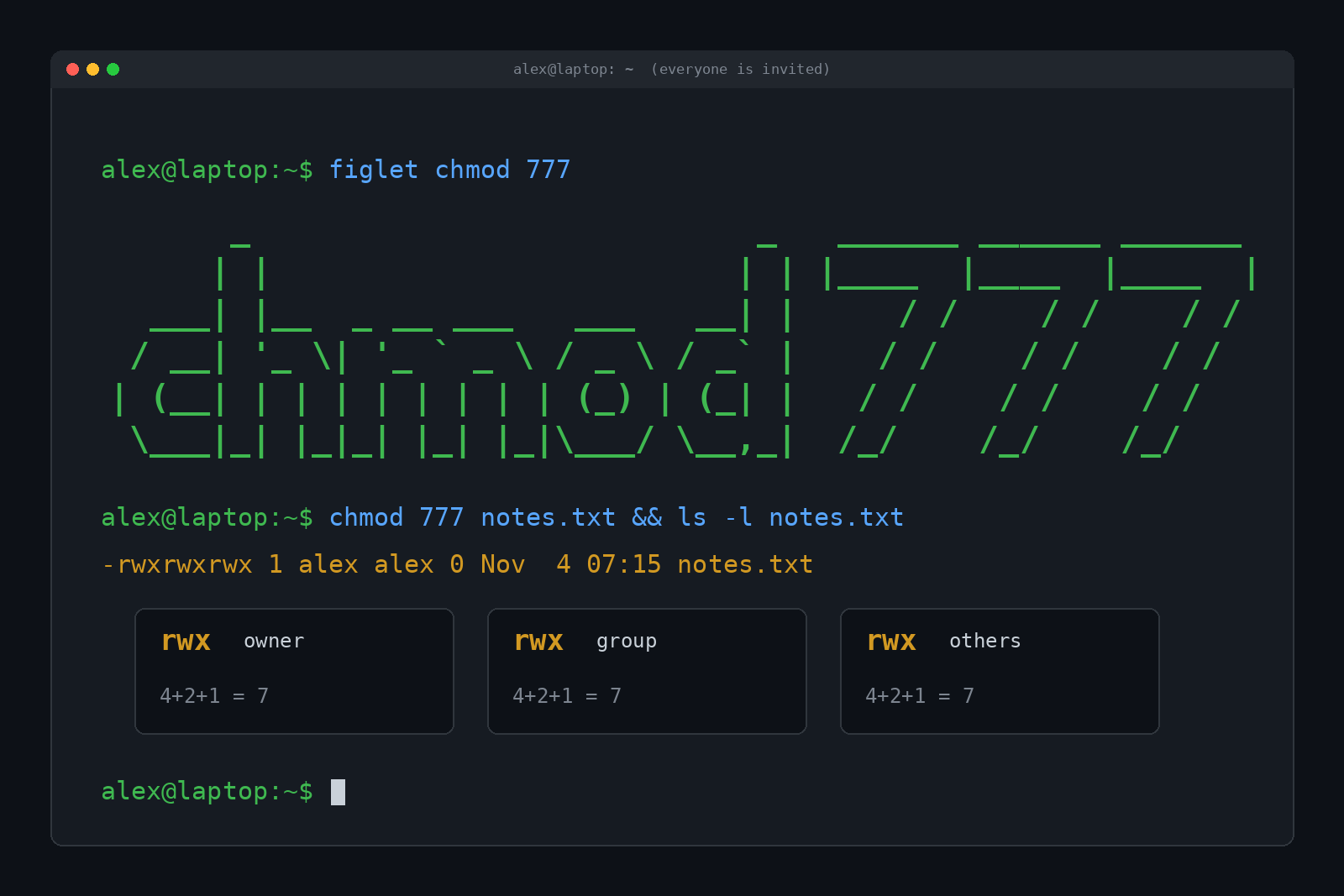
Short answer: chmod 777 is a Linux and macOS command that gives everyone on the system full permission to read, change and run a file or folder. The three 7s stand for the owner, the group and everybody else, and 7 means "read, write and execute, all of it." It usually makes a permission error go away, which is exactly why it's dangerous: it doesn't fix the problem, it removes the lock from the door.
So what are those numbers actually doing, why does the internet keep recommending them, and what should you type instead? Here's the whole thing in plain English.
What Does chmod 777 Mean?
Break the command into its two parts.
chmod is short for "change mode." On Unix-style systems (Linux, macOS, BSD), every file and folder has a mode, which is a small set of on/off switches that decide who can do what with it. chmod flips those switches. It's ancient, too. The BSD manual notes that a chmod command already existed in Version 1 of AT&T Unix, back in 1971.
777 is the new setting, written as three digits. Each digit covers one audience:
- First 7: the file's owner (usually whoever created it)
- Second 7: the file's group (a named bunch of accounts that share access)
- Third 7: others, meaning every other account on the machine
And each digit is a tiny bit of math. Read is worth 4, write is worth 2, execute is worth 1. Add up the ones you want. 4 + 2 + 1 = 7, so 7 means all three. Put three 7s together and you've handed everything to everyone.
That's the whole trick. Numeric chmod modes are just three sums.
How to Read rwxrwxrwx Without Squinting
When you list files with ls -l, you don't see numbers. You see a string like -rw-r--r--. Same information, different costume.
Here's real output from a test machine, creating a fresh file and folder as a regular user named alex:
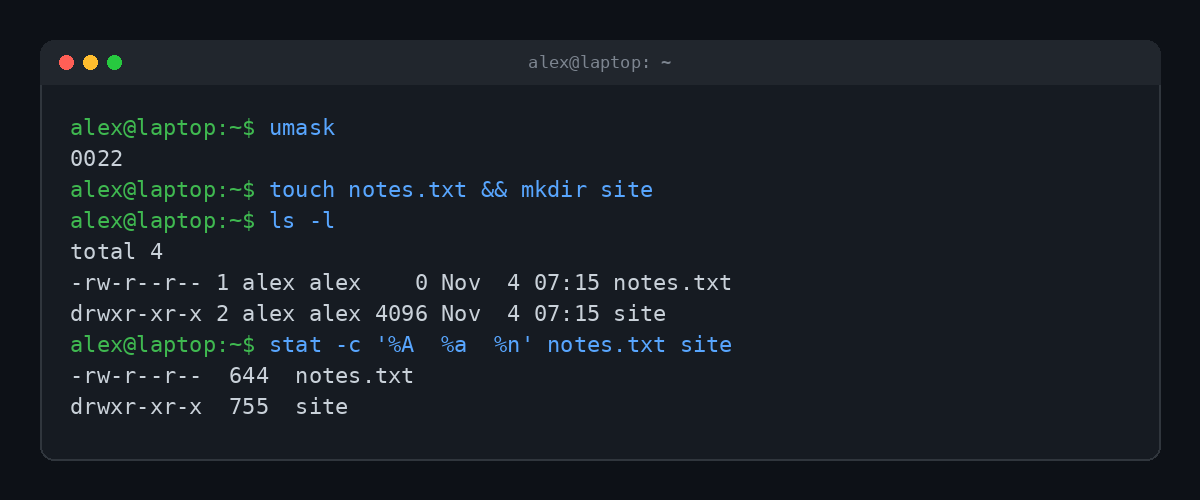
Read the string left to right:
- The first character is the type.
-is a regular file,dis a directory. - The next nine characters are three groups of three: owner, group, others.
- Inside each group,
ris read,wis write,xis execute, and-means "nope."
So -rw-r--r-- breaks down as: owner gets read and write (4 + 2 = 6), group gets read (4), others get read (4). That's 644. The stat command in the screenshot does the translation for you, which is handy when your brain is tired.
Why did new files come out as 644 in the first place? That's the umask, a setting that subtracts permissions from every new file you create. A umask of 022 strips write access from the group and everyone else. Many systems default to 022, and some use 002, which leaves group write on.
The cheat sheet
Every digit from 0 to 7 means exactly one thing:
| Digit | Letters | Meaning |
|---|---|---|
| 7 | rwx | Read, write, execute |
| 6 | rw- | Read and write |
| 5 | r-x | Read and execute |
| 4 | r-- | Read only |
| 3 | -wx | Write and execute (rare) |
| 2 | -w- | Write only (rare) |
| 1 | --x | Execute only (rare) |
| 0 | --- | Nothing at all |
Folders play by slightly different rules
On a directory, the letters mean something a little different, and this trips up everybody:
- r lets you list what's inside.
- w lets you create, delete and rename things inside. Even files you don't own.
- x lets you enter the folder and reach things inside it at all.
That middle one is the scary one. A world-writable folder means any account can delete anyone's files in it. Keep that in your back pocket for later.
Watch chmod 777 Let a Stranger In
Talk is cheap, so here's the real thing. Two accounts on the same Linux machine: alex owns a shared to-do file, and sam is another user who shouldn't be able to edit it.
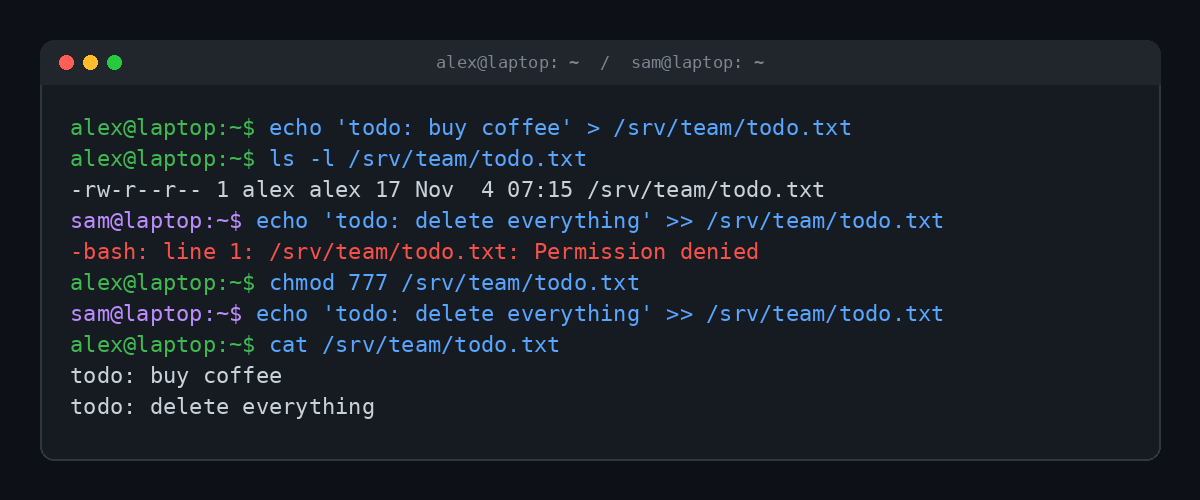
At 644, sam can read the file but gets Permission denied when trying to write. That's the system working. After one chmod 777, sam appends "delete everything" and nothing stops it. Alex didn't give sam access. Alex gave every account on the machine access, and sam just happened to be first in line.
On a laptop with one human user, that sounds harmless. But "every account" also includes the accounts that services run as: the web server, the database, that plugin you installed in 2019 and forgot about. If any one of them gets compromised, a 777 file is a free edit.
Why chmod 777 Is a Bad Idea
The fix-it-fast crowd isn't wrong that 777 works. The problem is everything else it does.
- Anyone can change it. On a web server, a bug in one app can let an attacker rewrite another app's files if those files are world-writable. Planting a malicious script in a 777 upload folder is one of the oldest tricks around.
- Anyone can run it. Execute permission on a text file or an image does nothing useful. Execute on a script means any account can launch it.
- It hides the real problem. A permission error usually means the wrong owner, not missing permissions. 777 papers over that, so the real issue comes back the next time something gets deployed.
- Some programs refuse to work with it. SSH won't use a private key that other accounts can read. It stops with a warning that the permissions are "too open." Security tools are allergic to 777 on purpose.
- There's no undo button. chmod doesn't remember the old settings. Run it recursively with
-Ron a big folder and you're rebuilding permissions from backups or memory.
The legend of chmod -R 777 /
Every sysadmin forum has a horror story about someone running chmod -R 777 /, which applies 777 to every file on the system. The details vary by teller, so treat the stories as folklore, but the mechanism is real and easy to show.
A numeric mode like 777 also wipes the setuid bit, a special flag that programs like sudo need to run with root power. We tested it on a throwaway machine: after chmod 777 /usr/bin/sudo, sudo flatly refuses to work and prints sudo: /usr/bin/sudo must be owned by uid 0 and have the setuid bit set. Do that to the whole system and you lose the tool you'd use to fix it. If sudo itself is a mystery, we covered it in What Does sudo Mean?
So When Is 777 Actually Fine?
Almost never on a file. But there's one famous folder that's world-writable on purpose: /tmp, the shared scratch space. On our test machine it shows up as drwxrwxrwt, mode 1777.
See that t on the end? That's the sticky bit. It means everyone can create files in the folder, but you can only delete or rename your own. It's 777 with a bouncer. If you truly need a shared drop folder, 1777 is the grown-up version of what people reach for 777 to do.
Other than that, throwaway containers and test VMs nobody else touches are about the only places where 777 won't hurt you. And even there it builds a bad habit.
What to Use Instead of chmod 777
Most "permission denied" problems have a boring, correct fix. Pick from this list before reaching for the sevens:
| Mode | Looks like | Typical use |
|---|---|---|
644 | -rw-r--r-- | Normal files, web pages, images |
755 | drwxr-xr-x | Folders, and scripts everyone may run |
600 | -rw------- | Secrets: SSH private keys, config files with passwords |
700 | drwx------ | Private folders, like ~/.ssh |
640 / 750 | -rw-r----- | Files a specific group needs, hidden from everyone else |
1777 | drwxrwxrwt | Shared scratch folders like /tmp |
And the moves that usually solve the actual problem:
- Fix the owner, not the mode. If a web app can't write to its uploads folder, the folder probably belongs to the wrong account.
chown(change owner) hands it to the account the app runs as, and 755 is plenty. - Use a group. If two people need to edit the same files, put them in a shared group and use 775 or 664. Strangers stay out.
- Check the parent folders. A file can be 777 and still be unreachable if a folder above it blocks entry.
namei -l /path/to/fileshows the permissions of every folder along the way. - Use symbolic mode for small changes.
chmod u+x deploy.shadds execute for the owner and touches nothing else. Much safer than retyping all nine bits.
Already ran 777 somewhere? Find the damage. This command lists files that anyone can write to, then the fix puts the to-do file back to normal:
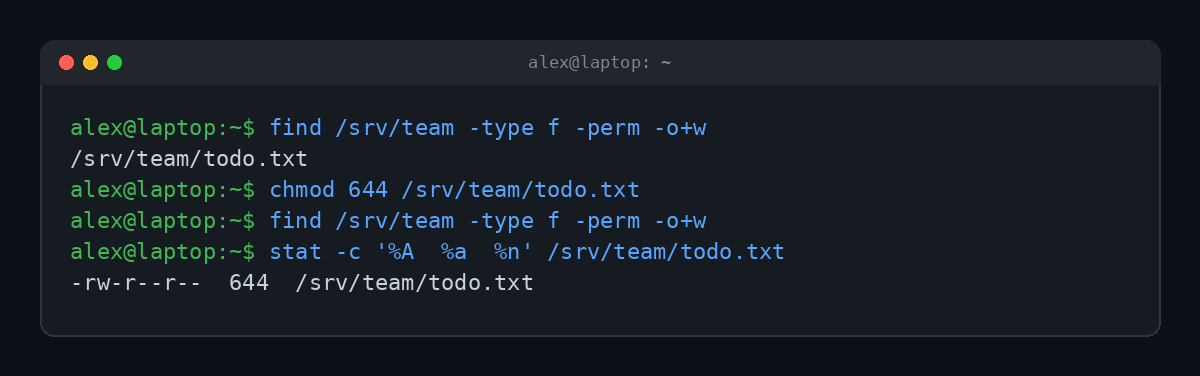
Point find at your project or web folder, look at what turns up, and set each item to the mode it actually needs.
chmod 777 vs a 403 Error
If you run a website, you've probably met the web version of "permission denied": the 403 Forbidden error. Sometimes the cause really is file permissions, like a page the web server account isn't allowed to read. The tempting fix is 777. The right fix is usually 644 for files, 755 for folders and the correct owner. We walk through the other causes in What Is a 403 Forbidden Error?
Sources, if you want to go deeper: the chmod manual page covers every mode and flag, Linuxize has a solid walkthrough of safer alternatives, and nixCraft explains how umask sets your defaults.
FAQ
What does chmod 777 do to a folder?
It lets every account on the system list the folder, enter it, and create, rename or delete anything inside it, including files owned by other people.
What's the difference between chmod 777 and chmod 755?
755 gives the owner full control and lets everyone else read and run, but not change anything. 777 lets everyone change everything.
Does chmod 777 work on a Mac?
Yes. macOS uses the same Unix permission system, so chmod works the same way in Terminal.
Is there chmod on Windows?
Not natively. Windows uses a different system called access control lists, managed in a file's Properties under the Security tab or with the icacls command. Inside WSL, the Linux layer on Windows, chmod works as usual on Linux files.
How do I undo chmod 777?
There's no automatic undo. Set the right mode by hand, usually chmod 644 for files and chmod 755 for folders, and restore anything sensitive (keys, configs) to 600.
TL;DR
chmod 777 means read, write and execute for the owner, the group and everyone else. It "fixes" permission errors by unlocking the file for every account on the machine, which is why it's a security hole. Use 644 for files, 755 for folders, 600 for secrets, and fix the owner with chown instead of opening the door to everybody.