You asked a perfectly reasonable question in a forum. Maybe it was about a command that wouldn't work, or a game setting you couldn't find. Ten minutes later, a reply. Four letters. No punctuation. No help.
RTFM.
Short answer: RTFM stands for "Read The F***ing Manual." It's old hacker and internet slang meaning "the answer to your question is already in the documentation, go look." Polite people swap the F for "Fine" or "Friendly." The meaning is the same either way: you were expected to check the docs before asking.
So where did it come from, is it always rude, and how do you avoid getting hit with it? Here's what RTFM means, plus how to actually read the manual it's yelling about.
What Does RTFM Mean?
RTFM is an initialism (you say the letters, R-T-F-M, you don't pronounce it as a word). The full version is "Read The F***ing Manual," and it's one of the oldest bits of slang in computing.
The Jargon File, the classic dictionary of hacker slang, describes it as the traditional, unhelpful reply a guru gives in a newsgroup or mailing list to someone who could have answered their own question by reading the documentation. The FOLDOC entry, which inherits that definition, also notes it's "always abbreviated." Nobody types the whole thing out. That's part of the charm, or the insult, depending on which side of it you're on.
The "manual" can be almost anything:
- The man pages built into Linux and macOS
- A program's official documentation website
- The FAQ pinned to the top of a forum or subreddit
- The literal paper booklet that came in the box, back when things came in boxes
The core message is always "this is a solved problem, and the solution is written down somewhere you didn't look."
Where Did RTFM Come From?
Nobody knows exactly. The Jargon File itself marks the earliest use as unknown, which is a little funny for a term about looking things up.
What we do know is where it lived. RTFM grew up in the places early computer people asked each other questions: Unix systems, mailing lists, and Usenet newsgroups in the 1980s and 1990s. Those communities ran on volunteers answering the same beginner questions over and over, and RTFM was the sound of a volunteer running out of patience.
The military and printer manual theories
You'll see claims that RTFM started in the military during World War II, or with photocopier and printer technicians in the 1980s. Treat those as folklore. They get repeated a lot, but there's no solid paper trail for either one. They're the kind of origin stories that sound right because grumpy technicians and thick manuals have existed forever.
rtfm.mit.edu: a server named after the insult
The best proof of how deep RTFM ran in early internet culture is a server. For years, MIT ran an anonymous FTP archive at rtfm.mit.edu that held the FAQ files from Usenet newsgroups, sorted by group name. Indiana University's old help pages pointed people there when they wanted the FAQ for a newsgroup.
Think about that. The place you went to read the FAQ was literally named "read the manual." The joke was built into the infrastructure.
The Manual in Question: Unix Man Pages
When old-school hackers said "the manual," they usually meant something specific: the man pages. These are the built-in reference docs that ship with Unix-style systems like Linux and macOS. The Unix Programmer's Manual goes back to the first edition of Unix in 1971, and the man command still opens it today.
Type man followed by a command name and you get its manual page right in the terminal. Here's the top of the page for ls, the command that lists files:
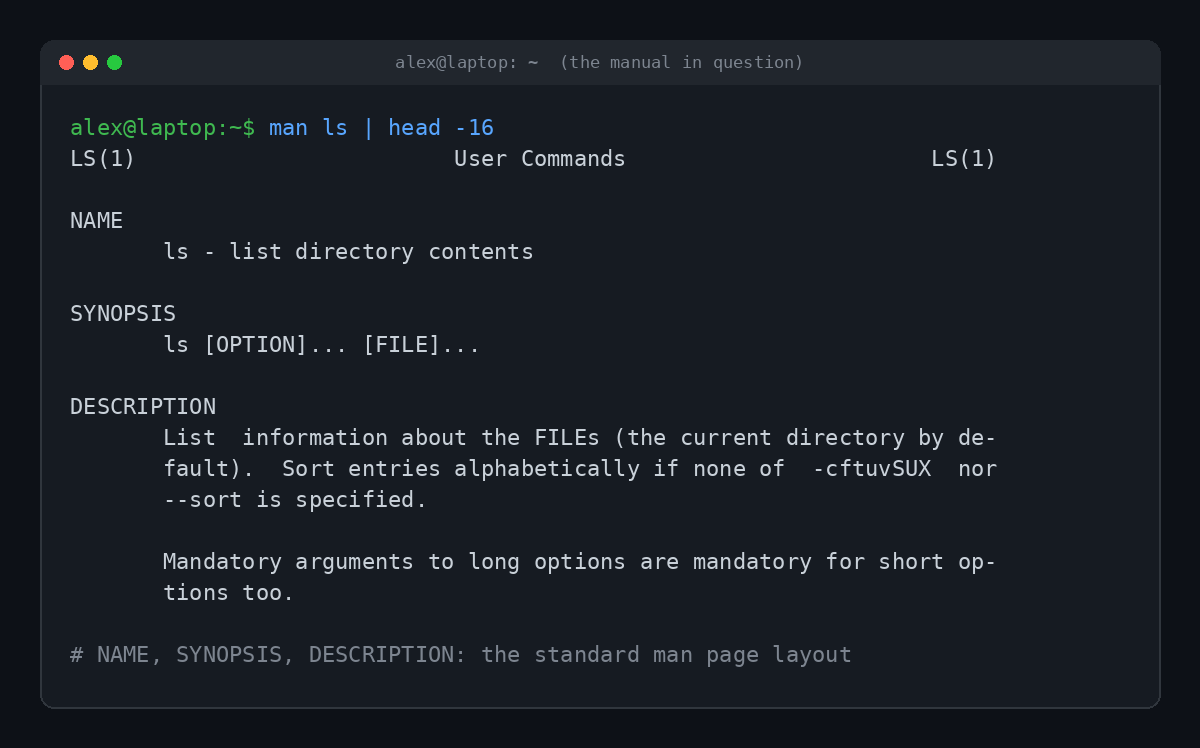
That layout is the secret to reading man pages without falling asleep:
- NAME tells you what the command does in one line.
- SYNOPSIS shows how to type it. Square brackets mean optional, and
...means "you can repeat this." - DESCRIPTION explains every option, usually in exhausting detail.
- EXAMPLES, when a page has them, is often the part you actually wanted. Skip to it.
Inside man, press / to search, n to jump to the next match and q to quit. That last one is important. More than one beginner has been trapped in a man page wondering how to leave.
How to Actually RTFM (Without Losing an Afternoon)
Here's the dirty secret of RTFM: the manual is often long, dense and written by people who already knew the answer. So the real skill isn't reading the whole thing. It's finding the one line you need.
A real example. Say someone hands you a file called backup.tar (a tar file is a bundle of files rolled into one) and you just try running tar on it:
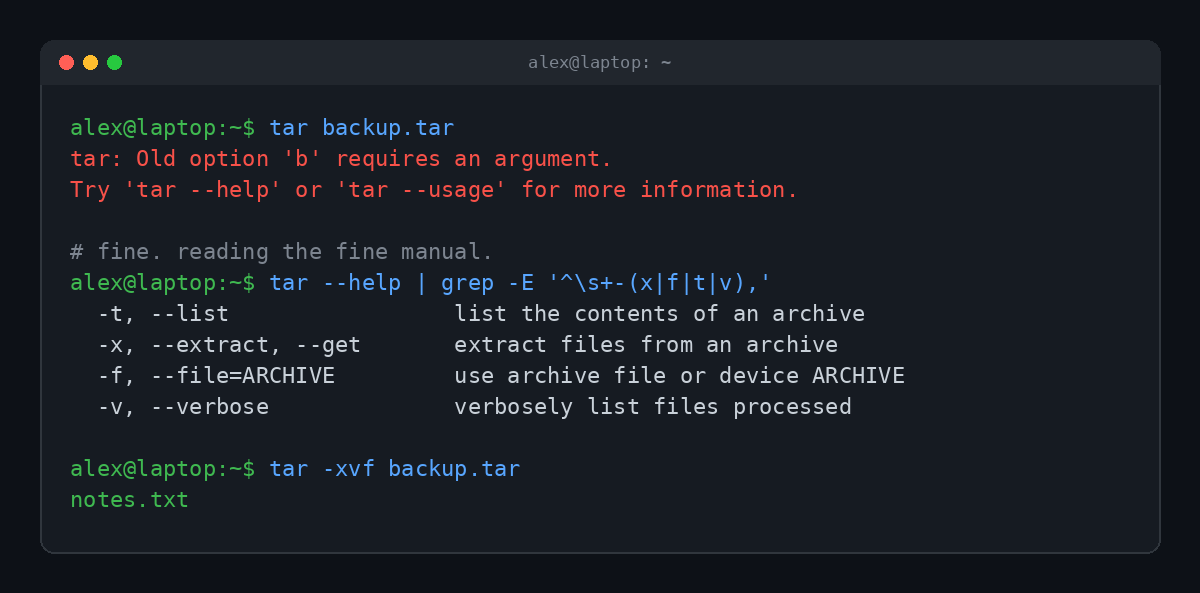
The error is baffling. "Old option b"? You never typed a b. (tar is reading your filename as a bundle of old-style option letters, which is exactly the kind of thing the manual explains.) But the error message itself says what to do: try 'tar --help'. Filter the help for the four options you care about, and suddenly tar -xvf backup.tar makes sense: extract, verbose, from this file.
That's the whole RTFM workflow. Here are the tools for it:
| Command | What it does |
|---|---|
man ls | Opens the full manual page for a command |
ls --help | Prints a shorter built-in summary (most Linux tools support it) |
whatis ls | Gives you the one-line description from the man page |
apropos "copy files" | Searches every man page description for a keyword |
Get-Help / /? | The Windows versions: PowerShell's help command, and the help switch for classic Command Prompt tools |
The underrated one is apropos. If you don't know a command's name, you can search the manuals by what you want to do:
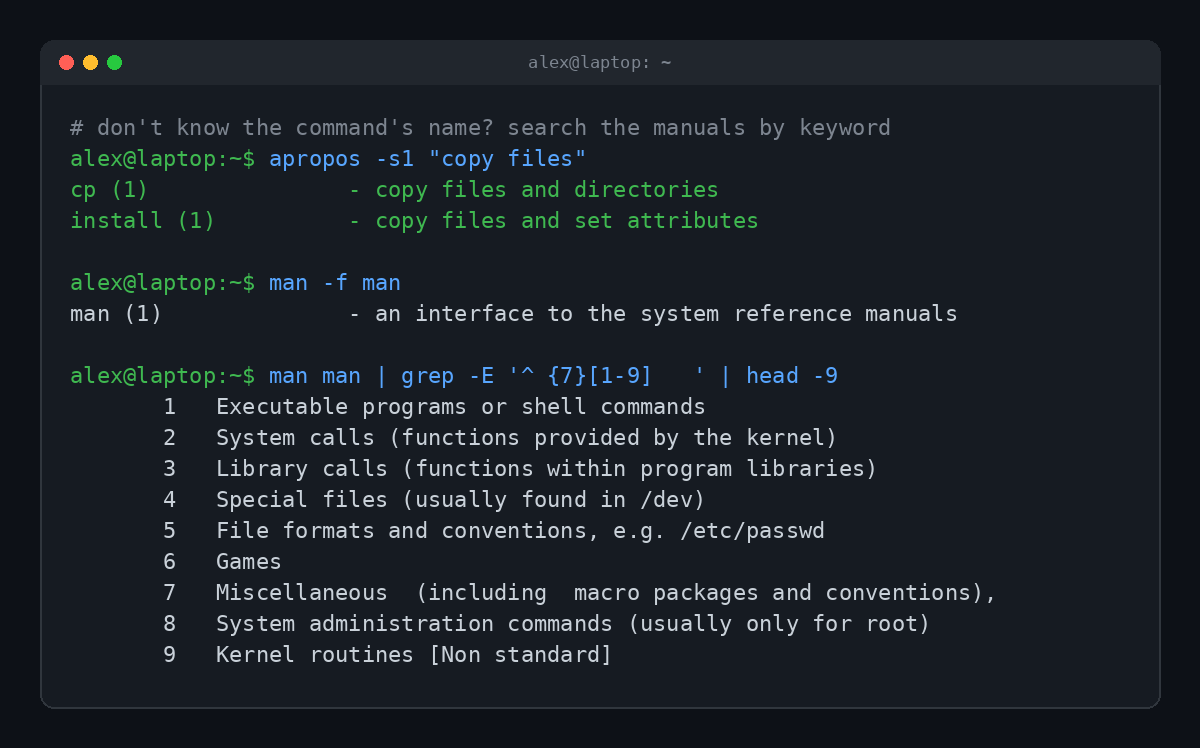
Those numbers in parentheses, like cp (1), are manual sections. Section 1 is everyday commands, section 5 is file formats, section 8 is admin tools, and section 6 is, wonderfully, games. When someone writes printf(3), they mean the programming function in section 3, not the shell command in section 1.
Is RTFM Rude?
Usually, yes. There's a reason the polite version had to be invented.
But it's a little more complicated than that. Eric S. Raymond's famous essay How To Ask Questions The Smart Way, a sort of etiquette guide for hacker communities, argues the opposite side. It says the person who tells you RTFM is "almost certainly right," and that they usually have the page with your answer open while they type. In that view, RTFM is a hint wrapped in sandpaper. You should, as the essay puts it, be thankful for "this grandmotherly kindness."
Plenty of people disagree. The criticism goes like this:
- It assumes the manual is good. Lots of documentation is outdated, missing, or written for experts only.
- It assumes the asker knows where to look. Beginners often don't know a command's name, so they can't look it up.
- It scares people off. Developer advocates have written pieces with titles like "It's Time to Retire RTFM," arguing it drives newcomers out of communities that need them.
The fair middle ground: a bare "RTFM" is rude. "RTFM, it's in section 3 of the docs, here's the link" is helpful with a side of attitude. The Jargon File itself admits the flip side: sometimes the person did read the manual, and it didn't help.
RTFM's Cousins: STFW, LMGTFY and Friends
RTFM spawned an entire family of slightly passive aggressive acronyms. Here are the ones you'll run into:
| Acronym | Stands for | Translation |
|---|---|---|
| RTFM | Read The F***ing Manual | It's in the docs |
| RTFAQ | Read The F***ing FAQ | It's in the pinned post |
| STFW | Search The F***ing Web | It's one search away |
| RTFS | Read The F***ing Source | There are no docs, read the code |
| UTSL | Use The Source, Luke | Same idea, with a Star Wars joke |
| RTFA | Read The F***ing Article | You commented without reading the link |
| LMGTFY | Let Me Google That For You | A link that types your question into Google for you, slowly |
LMGTFY deserves a special mention. The site's gimmick was a little animation of your question being typed into a search box, then the button getting clicked. By 2009 it was making mainstream news. It's RTFM turned into performance art.
If you like this kind of slang, we've dug into a couple of its relatives: What Does Pwned Mean? covers the gamer typo that became a security term, and What Does sudo Mean? covers the command that makes you root, which has a man page worth reading before you use it.
How to Ask So Nobody Says RTFM
Want to never see those four letters again? Show your homework. Communities are far kinder to people who clearly tried first. Before you post:
- Search the exact error message. Copy it word for word, in quotes. Someone has seen it before.
- Check the official docs and the FAQ. Even a quick skim counts.
- Say what you already tried. "I read the man page and tried
-x, but got this error" turns an RTFM into a real answer. - Include the details. Your operating system, the version, the exact command and the exact output.
- Ask a specific question. "How do I extract one file from a tar archive?" beats "tar is broken help."
This is also how a lot of people get good at this stuff in the first place. Reading docs is a skill, and the people who learn it fastest tend to be the ones everybody calls hackers. We wrote about that path in How Do Hackers Learn to Hack?
FAQ
What does RTFM stand for?
RTFM stands for "Read The F***ing Manual." The family friendly versions are "Read The Fine Manual" and "Read The Friendly Manual."
Is RTFM a swear word?
The abbreviation hides one, which is why people use it in places they wouldn't type the full phrase. It's still considered rude in most professional settings.
What does RTFM mean in gaming?
Same thing. Players use it when someone asks a question that's answered in the game's guide, tutorial, patch notes or the community wiki.
What should I reply to RTFM?
The best comeback is a better question. Say what you read, what you tried and what happened. If the docs really don't cover it, that's worth saying too.
What is the man command?
It's the command on Linux and macOS that opens a program's manual page in the terminal. Type man and a command name, like man ls, and press q to exit.
TL;DR
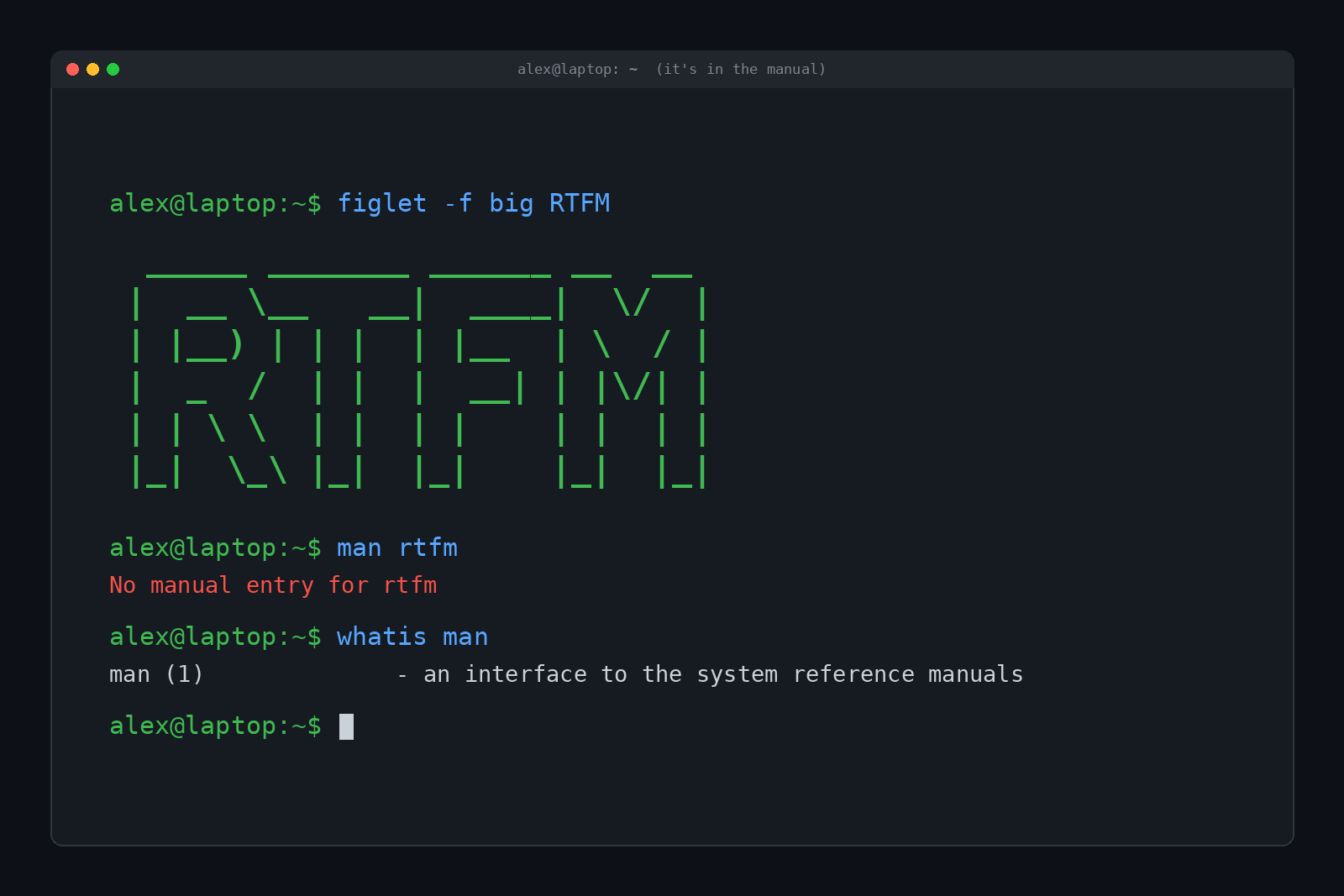
RTFM means "Read The F***ing Manual," a blunt bit of hacker slang telling you the answer is already in the documentation. Its exact origin is unknown, but it grew up on Unix systems, mailing lists and Usenet, where the "manual" was usually the man pages. It's mostly rude, sometimes helpful, and the easiest way to avoid it is to show what you already tried. And if you ever type man rtfm, the terminal will tell you there's no manual entry for it. Fitting.