You're following a tutorial. Step three says to type sudo apt update. You do it, the terminal asks for your password, and when you type it nothing shows up on screen. No dots, no stars, nothing. Did it break? Did you just give a stranger's script the keys to your computer?
Short answer: sudo is a command on Linux, macOS and other Unix-style systems that runs one command with administrator powers. The name originally meant "superuser do," and today it's usually read as "substitute user, do." You type sudo in front of a command, prove it's really you with your own password, and that one command runs as root, the all-powerful account that can change anything on the system.
So what does sudo actually mean, why does it act so weird about passwords, and why does the internet keep telling it to make sandwiches? Let's take it apart.
What Does sudo Mean?
On Unix-style systems there's one account that can do absolutely everything. It's called root, also known as the superuser. Root can read any file, delete any file, install software, change other people's passwords and break the whole machine with one typo.
Your normal account can't do those things, and that's on purpose. If every program you ran had root powers, then every buggy script and every piece of malware would too.
sudo is the middle ground. Instead of logging in as root and staying there, you borrow root's powers for a single command:
apt updateruns as you, and fails because you can't touch the system's package lists.sudo apt updateruns as root, and works.
As for the name, the official sudo project writes it as su "do". The su part is an older Unix command that lets you switch to another user (root, by default). Add "do" and you get "do this one thing as another user." The sudo project's history page traces it back to around 1980.
Pronunciation is a whole separate fight. Some people say "sue-doo," some say "sue-dough" like pseudo. The project's own spelling leans toward "sue-doo," but nobody will revoke your terminal for the other one.
Watch sudo Turn You Into Root
Here's real output from a Linux test machine, logged in as a regular user named alex. Watch what changes when sudo shows up:
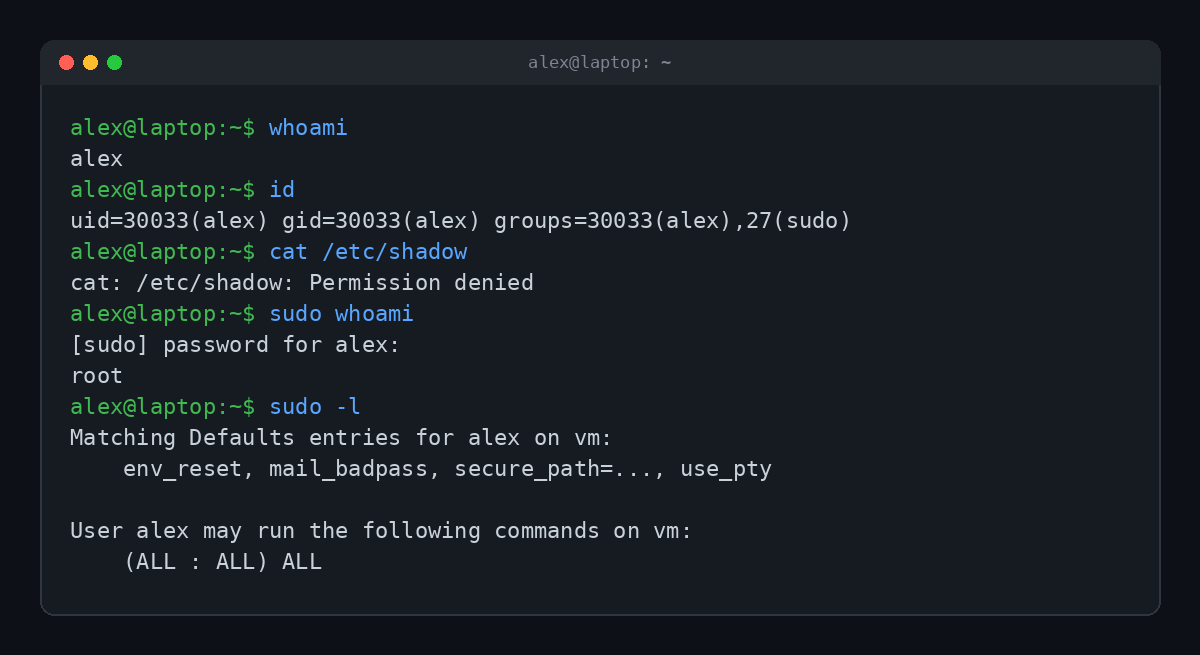
Line by line:
whoamisays alex. Just a regular person.idshows alex is in a group called sudo. On Ubuntu and Debian, membership in that group is what lets you use sudo at all.cat /etc/shadowfails. That file holds the system's password hashes, and normal users don't get to read it.sudo whoamiasks for alex's password, then answers root. For that one command, alex was root.sudo -llists what you're allowed to do.(ALL : ALL) ALLis sudo's way of saying "anything, as anyone."
Sudo isn't an on/off switch for being an admin. The rules live in a file called /etc/sudoers, and they can be very specific. You can let one person restart the web server and nothing else, or let a backup script read files without letting it install software.
Why Doesn't sudo Show My Password When I Type?
This is easily the most asked sudo question, and the answer is: it's working fine. Traditional sudo doesn't echo anything while you type your password. No asterisks, no dots. Type it, press Enter, done.
Why so stingy? Showing asterisks tells anyone looking over your shoulder exactly how long your password is. Old-school Unix decided that was too generous.
There's a plot twist, though. Ubuntu switched its default to sudo-rs, a rewrite of sudo in the Rust programming language, starting with Ubuntu 25.10. The Ubuntu 26.04 LTS security notes confirm it's the default there too, with the original sudo still available as a fallback. And sudo-rs shows asterisks while you type by default. So depending on how new your Ubuntu is, you might see stars or you might see nothing at all. Both are normal.
What "alex Is Not in the sudoers File" Means
If your account isn't allowed to use sudo, you get one of the most famous error messages in Unix. Here's the real thing, with sudo's optional first-time "lecture" turned on:
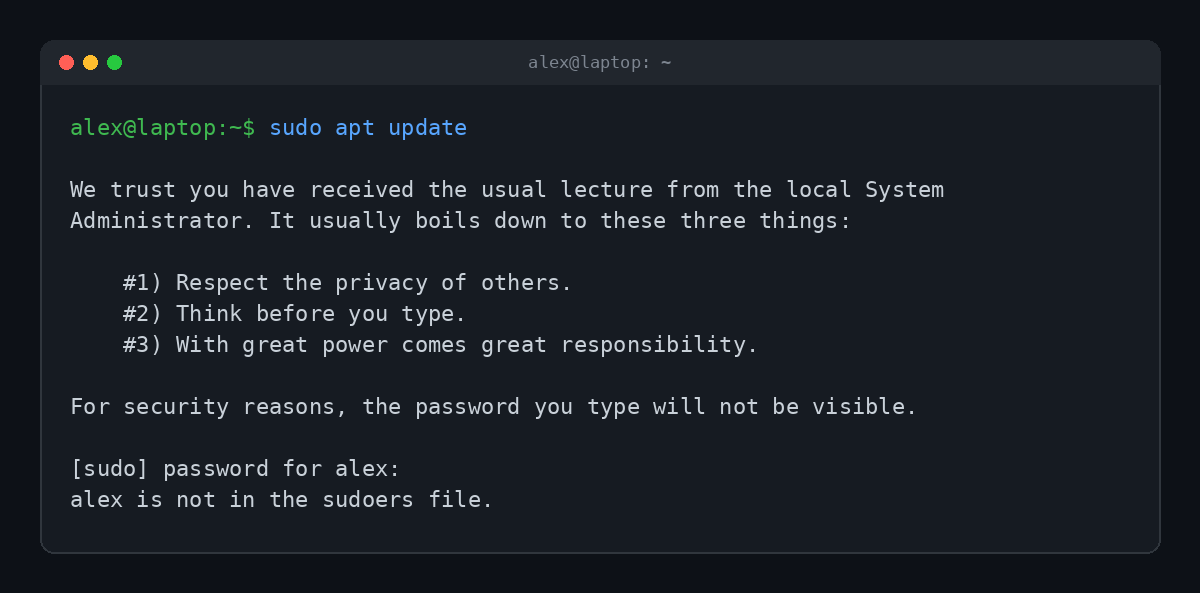
Two things worth knowing here.
First, the lecture. Those three rules have shipped with sudo for decades, and rule number three is a straight Spider-Man quote. Many systems turn the lecture off by default, but it's still in there, waiting.
Second, the threat. For years this error ended with This incident will be reported. That line became a meme, mostly because on most home machines it was reported to precisely nobody. The sudo team removed that wording in sudo 1.9.10 in 2022. Newer versions only say an incident has been reported when sudo is actually set up to send that email. Notice it's missing from the screenshot above.
So what do you do about it? On your own machine, you need someone with root access to add you. On Ubuntu that's usually sudo usermod -aG sudo yourname, run from an account that already has sudo, followed by logging out and back in. If it's not your machine, the honest fix is asking whoever owns it.
sudo vs su: What's the Difference?
People mix these up constantly, and they're related, so it's fair. Here's the cheat sheet:
| Command | What it does | Whose password? |
|---|---|---|
sudo command | Runs one command as root | Yours |
su | Switches you into a root shell until you type exit | Root's |
sudo -i | Opens a root login shell using sudo | Yours |
sudo -u bob command | Runs one command as user bob instead of root | Yours |
sudo -k | Forgets your recent password entry, so the next sudo asks again | None |
The big win with sudo is that nobody needs to know the root password. Each person uses their own, and sudo logs who ran what. With su, everyone shares one root password, and the logs just say "root did it." Very helpful when something breaks at 2 AM.
You'll also notice sudo doesn't ask for your password every single time. After a successful entry it remembers you for a short grace period, typically 5 minutes per terminal, though distributions can change that.
Where sudo Came From
sudo is older than most of the people using it. According to the official history, Bob Coggeshall and Cliff Spencer wrote the first version around 1980 in the computer science department at SUNY Buffalo, on a VAX-11/750 running 4.1BSD.
From there it bounced around. Versions were posted to the Usenet group net.sources in 1985, maintained at the University of Colorado Boulder in the late 1980s, and rewritten with a fancier sudoers format in 1991. Todd C. Miller has been the maintainer since 1994, a remarkably long run for one maintainer.
In 2024, Microsoft shipped its own sudo for Windows. It looks similar from the outside but works completely differently under the hood. It's available in Windows 11 version 24H2 and later, and you turn it on under Settings, then System, then For developers. It can run the elevated command in a new window, in the same window with input disabled, or inline like the Unix version.
The Sandwich Joke, Explained
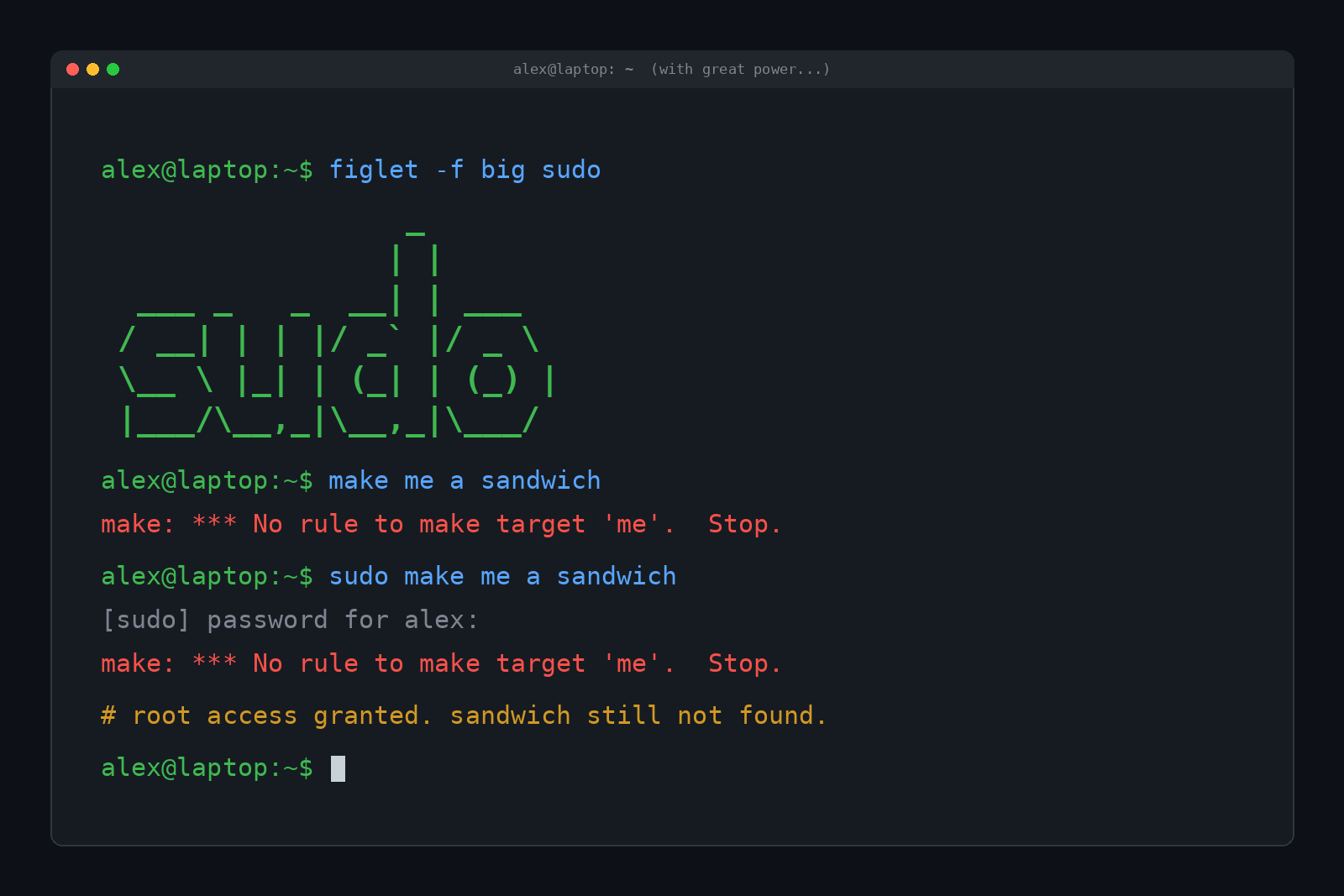
If you've hung around programmers, you've seen "sudo make me a sandwich" on a shirt, a mug or a sticker. It comes from xkcd comic #149: one person says "make me a sandwich," gets told "what? make it yourself," then says "sudo make me a sandwich" and gets "okay." sudo as the ultimate authority, even over lunch.
Of course, we had to try it. Turns out make is a real program that builds software, and it has opinions. The actual result, with and without sudo, is make: *** No rule to make target 'me'. Stop. Root access does not include a deli. (That's the real output in the image at the top of this post.)
The joke stuck around so well that coffee drinkers got their own version.
sudo Has a Secret Insult Mode
Here's a fun one most people never find. sudo can insult you when you mistype your password. It's off by default, but adding Defaults insults to the sudoers file turns it on:
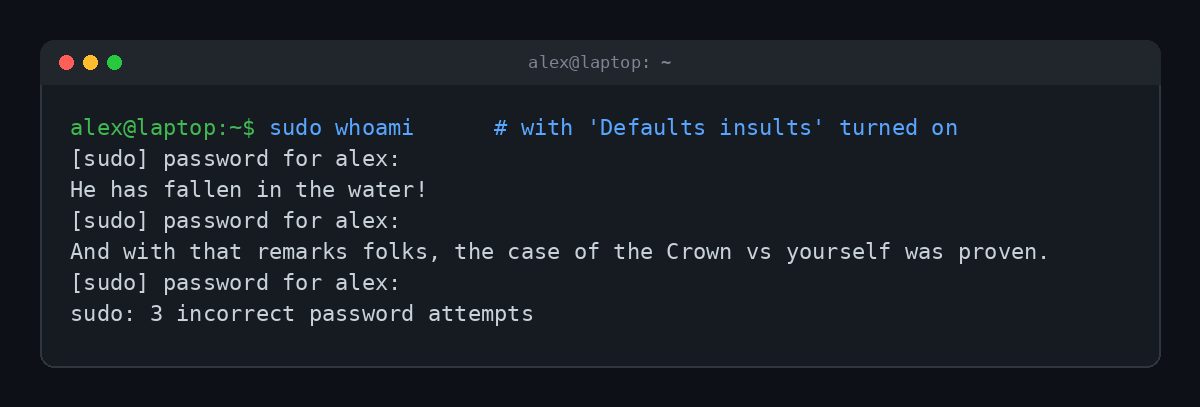
Some of the insult sets are lifted from the 1950s BBC radio comedy The Goon Show, which explains why they sound like a confused British uncle. Others are classic Unix snark. It's pure nerd heritage, and it changes nothing about security.
Is sudo Safe? A Few Rules That Actually Matter
sudo is safe in the sense that it's a well-tested gatekeeper. The risk is what you tell it to do. A command with sudo in front can wipe your disk, and sudo will happily help.
- Don't paste sudo commands you don't understand. "Just run this one-liner as root" is a favorite trick in fake support forums and scam videos.
- Be extra wary of
curl ... | sudo bash. That downloads a script and runs it as root without you ever reading it. - Use the least power you need. If a command works without sudo, don't add it "just in case."
- Keep sudo updated. It has had serious bugs. The best-known, nicknamed Baron Samedit (CVE-2021-3156), was disclosed by Qualys in January 2021. It let any local user become root, and it had been hiding in the code for about ten years. Bugs like that are part of why Ubuntu moved to a memory-safe Rust version.
Your sudo password is just your normal account password, so it's only as strong as that. If you want the uncomfortable details on how those get cracked, we covered it in How Do Hackers Get Passwords? And if you use sudo on remote machines, you're probably connecting with SSH first, which we explained in What Is SSH and Why Do Developers Live in a Black Terminal Window?
Getting root on a machine you shouldn't is also the moment a hacker would call it pwned. Which is exactly why sudo makes you prove who you are.
FAQ
What does sudo stand for?
It originally stood for "superuser do." Today it's usually explained as "substitute user, do," because it can run commands as any user, not just root.
Which password does sudo want?
Your own account password, not the root password. That's the whole point. Nobody needs to share root's password.
Does sudo work on Mac?
Yes. macOS includes sudo, and admin accounts can use it in Terminal right away.
Is there sudo on Windows?
Yes, on Windows 11 version 24H2 and later. It's off by default and gets turned on in the developer settings.
Why is sudo "not found" on my system?
Some minimal Linux installs and containers don't include it. You'd install it as root with the system's package manager, or use su instead.
TL;DR
sudo means "superuser do" (or "substitute user, do"). Put it in front of a command and that one command runs as root, after you prove it's you with your own password. The invisible password is normal, "not in the sudoers file" means your account isn't allowed, and no, it still won't make you a sandwich.