You click a link to your account page, a private dashboard or some API you were promised would "just work." Instead of the page, you get a stern little message: 401 Unauthorized. Not "not found." Not "forbidden." Unauthorized. Like a bouncer who hasn't even looked at your face yet.
Short answer: a 401 Unauthorized error means the server needs to know who you are before it will show you the page, and you either didn't prove it or your proof didn't work. No login, a wrong password, an expired session or a missing API key all end in a 401. Despite the name, it's about authentication (who are you?), not permission. Permission problems get a different code, the famous 403.
So why is it called "Unauthorized" when it really means "unidentified," and how do you get past it? We set up a tiny password-protected test server and poked it until it complained.
What Does 401 Unauthorized Mean?
Every time your browser asks a server for something, the server replies with a three-digit HTTP status code. The 400s are the "something's wrong with your request" family. 401 is the one that specifically means "you need valid credentials for this, and you don't have them."
The current HTTP standard, RFC 9110, puts it plainly: the request "has not been applied because it lacks valid authentication credentials for the target resource." Translation: the server didn't even consider whether you're allowed in, because it has no idea who you are.
Here's the part most explanations skip. A proper 401 isn't just a rejection. It's a challenge. The server is required to send back a header called WWW-Authenticate that says how you're supposed to log in. It's the bouncer saying "no ID, no entry, and by the way, we take driver's licenses."
A 401 Error in Real Life
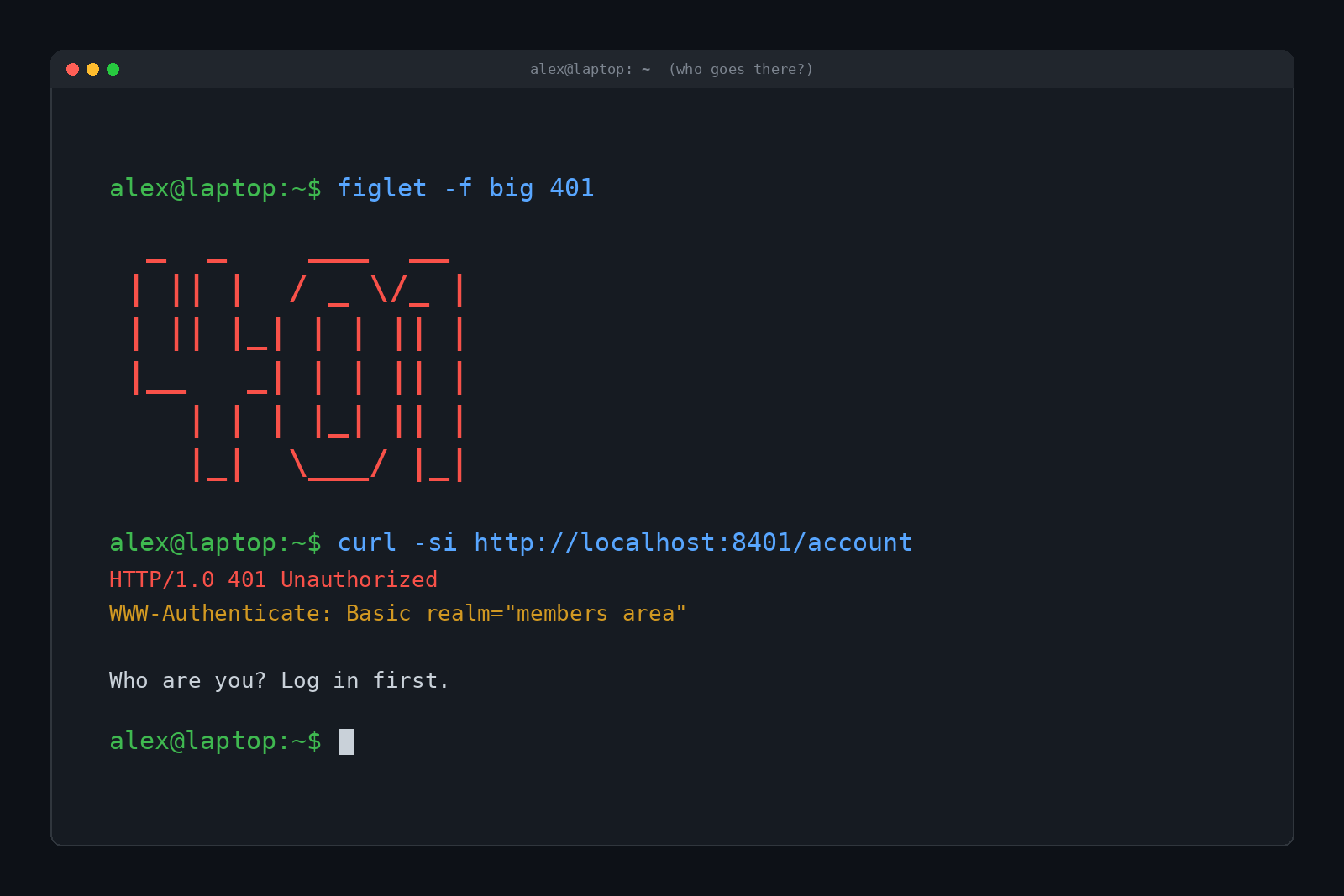
To see it happen, we built a tiny fake "members area" on a test laptop. It has one user, alex, protected with the oldest login method on the web, HTTP Basic authentication. Then we asked for the account page with curl, a command-line tool that fetches web pages and shows you the raw response.
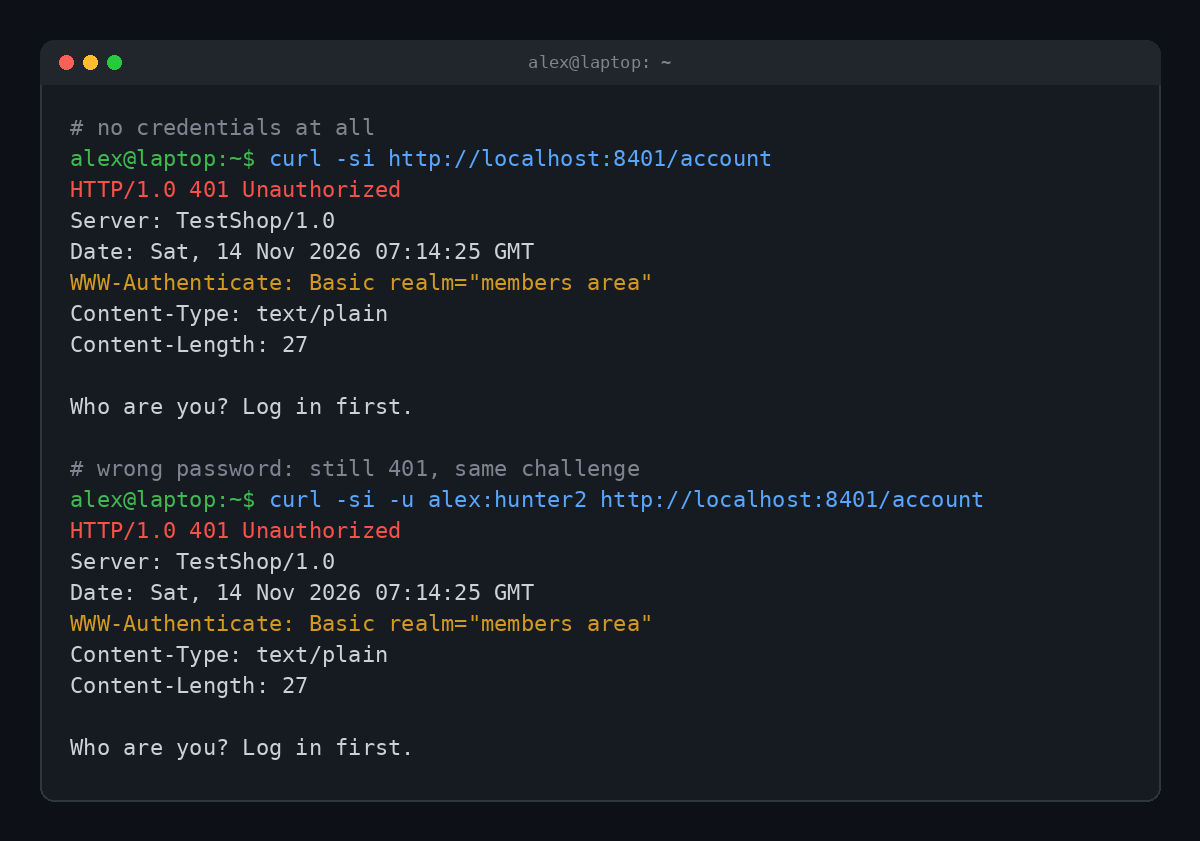
Two things to notice. First, the yellow line: WWW-Authenticate: Basic realm="members area". That's the challenge. It tells the client "use Basic login, and this protected zone is called members area." When a browser sees that header, it pops up that plain gray username and password box you've probably seen on old routers and staging sites.
Second, a wrong password gets exactly the same answer as no password at all. That's by design. The server doesn't tell you whether the username exists or the password was close. It just says "try again." (And yes, hunter2 is a nod to an ancient IRC chat log that became internet folklore, in which someone's password supposedly showed up as asterisks for everyone else. It did not.)
401 vs 403: What's the Difference?
This is the question everyone actually has, because the two codes sound like synonyms. They're not.
- 401 Unauthorized means "I don't know who you are." Log in, or log in properly, and you might get in.
- 403 Forbidden means "I know exactly who you are, and the answer is still no." Logging in again won't help.
Here's the same test server again. This time alex uses the right password, first on his own account page, then on the admin page he has no business visiting:
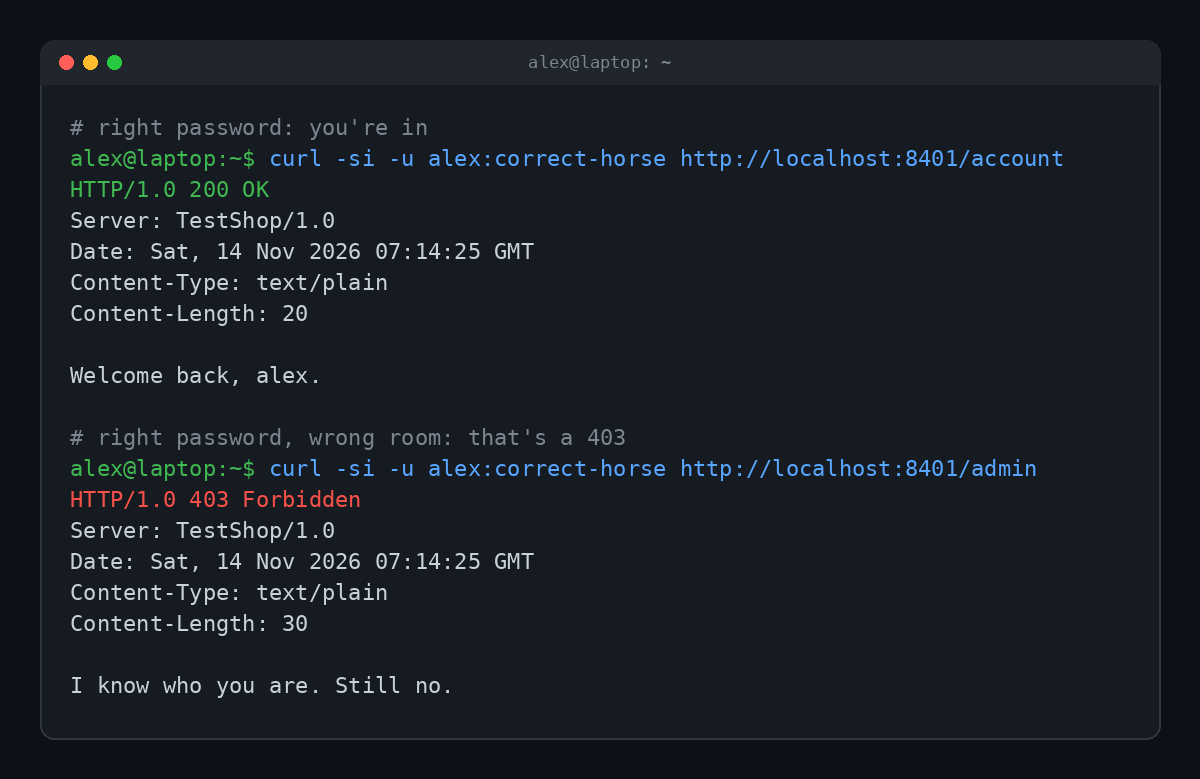
Once the server knows who you are, it stops sending 401s. The question changes from "who are you?" to "are you allowed?" and the answer to that second question, when it's no, is a 403. We cover that one in detail in What Is a 403 Forbidden Error?, which, given the name of this blog, you may have guessed is a personal favorite.
| 401 Unauthorized | 403 Forbidden | |
|---|---|---|
| Plain English | "Who are you?" | "I know who you are. No." |
| The problem | Missing or invalid credentials | Valid identity, not enough permission |
| Will logging in help? | Usually, yes | Usually, no |
| Must include a login challenge? | Yes (WWW-Authenticate) | No |
| Typical cause | Expired session, wrong password, missing API key | Wrong account, blocked IP, file permissions |
One twist: some servers deliberately send a 404 Not Found instead of a 403 for things you're not allowed to see. The standard explicitly allows this. If a server admits a secret admin page exists, it has already told you something.
Why Is It Called "Unauthorized" If It Means Unauthenticated?
Because the name is older than the distinction. The 401 code was written down in RFC 1945, the HTTP/1.0 spec from May 1996, which described it as "The request requires user authentication." The label "Unauthorized" was already attached, and once a status code ships to every browser and server on the planet, nobody gets to rename it.
Security people now split the idea in two:
- Authentication is proving who you are (a password, a passkey, a token).
- Authorization is deciding what that identity is allowed to do.
By today's vocabulary, 401 should really be called "Unauthenticated" and 403 is the real "Unauthorized." The modern spec quietly acknowledges the muddle: it says that if you did send credentials and still got a 401, then "authorization has been refused for those credentials." So the name is half right, which in web standards counts as a win.
What Your Browser Actually Sends When You Log In
After the 401 challenge, the client tries again with an Authorization header (another naming crime, since it carries authentication). With Basic authentication, that header is just your username and password glued together with a colon and run through Base64.
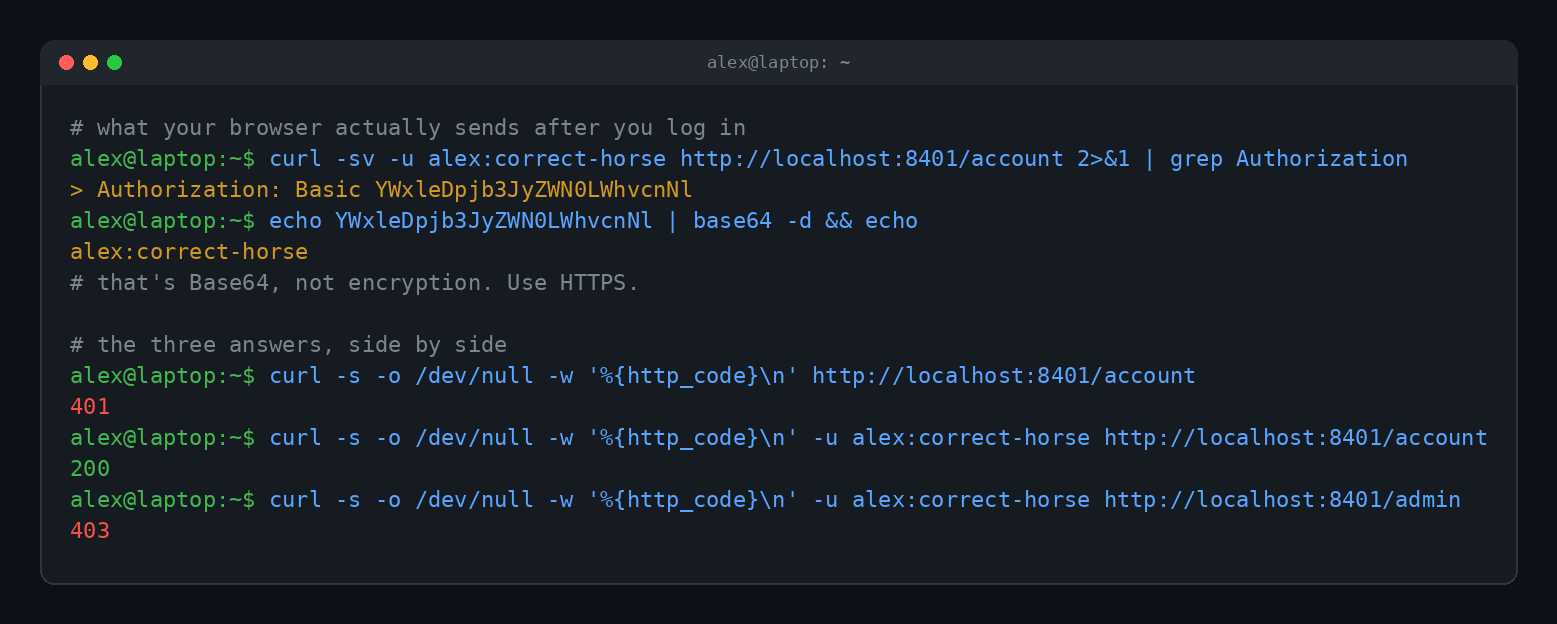
One command and the "secret" is back in plain text. As we explain in What Is Base64?, Base64 is packaging, not a lock. The Basic auth spec, RFC 7617, says so itself: the username and password travel "as cleartext," so it should only ever be used over HTTPS.
Most modern websites don't use Basic auth for normal logins. They show you a nice login form and then remember you with a session cookie. APIs usually use tokens instead, sent as Authorization: Bearer <token>. But the 401 logic is the same: no valid credential, no entry. (Our test password, by the way, is a nod to the famous xkcd comic about "correct horse battery staple." Please don't use it.)
What Causes a 401 Error?
The usual suspects, roughly in order of how often they bite:
- You're not logged in. You opened a bookmarked page from a private area, or your session cookie never got set.
- Your session expired. Many sites log you out after a period of inactivity. The next click gets a 401 (or a redirect to the login page).
- Wrong username or password. Including the classic "Caps Lock was on."
- A stale saved login. Your browser or password manager keeps sending an old password after you changed it.
- A missing, expired or revoked API key or token. Very common for developers and apps. Tokens often expire after an hour or less.
- Something in the middle ate the header. Some proxies and server setups strip the
Authorizationheader before it reaches the app, so the app thinks you never sent one.
How to Fix a 401 Error
If you're just visiting
- Log out and log back in. This fixes expired sessions, which is the most common cause by far.
- Double-check the URL. A typo can land you in a protected area you didn't mean to visit.
- Clear cookies for that one site. A broken session cookie can keep you stuck. Most browsers let you do this from the padlock or site info icon next to the address bar.
- Try a private window. If it works there, an old saved login or cookie is the problem.
- Reset your password if you're sure the username is right and it still fails.
- Wait it out if the site's login system itself is having trouble. You can't fix their server.
If it's your site or API
- Check what the client is actually sending. Run the request with
curl -vand look for theAuthorizationline, exactly like the screenshot above. - Check token expiry. An access token that was fine at lunch can be dead by dinner.
- Check the proxy and server config. Make sure the
Authorizationheader is passed through to the application. - Send a real challenge. The spec says a 401 must include
WWW-Authenticate. Plenty of APIs skip it, which makes their 401s harder to debug. - Use the right code. Logged-in user hitting something they can't access? That's a 403, not a 401. Getting this wrong confuses clients that automatically retry logins on a 401.
Quick Answers
Is a 401 error my fault?
Often it is, in the mildest way: you're logged out, your session expired or a password is wrong. Logging in again fixes most of them.
Is 401 the same as 403?
No. A 401 means the server doesn't know who you are yet. A 403 means it knows and still won't let you in.
Can a 401 error mean I've been hacked?
Not by itself. If your correct password suddenly stops working everywhere, though, reset it and check whether someone else changed it.
Why do I get a 401 error in an API?
Almost always a missing, mistyped or expired API key or token. Check that the Authorization header is present and the token is still valid.
What is 407 Proxy Authentication Required?
It's 401's sibling. Same idea, but the one asking for a login is a proxy server between you and the website, not the website itself.
TL;DR
A 401 Unauthorized error means the server wants proof of who you are and didn't get valid proof. It comes with a login challenge, and logging in (again) usually fixes it. If you're logged in and still blocked, that's a 403, which means "we know who you are, and no."