You download a file, and right next to the download button there's a wall of gibberish labeled "SHA-256." Your password manager talks about "hashing." Somebody on a forum says a site "stored passwords as MD5" in the same tone people use for "left the stove on." So what is hashing, and why does everyone in security care so much about it?
Short answer: hashing turns any input, a word, a password, a 4 GB movie, into a short fixed-length fingerprint called a hash. The same input always produces the same hash, a tiny change produces a completely different one, and there's no practical way to run it backward. That makes hashes perfect for checking that files haven't been tampered with and for storing passwords without storing the actual passwords.
What Is Hashing, in Plain English?
A hash function is a recipe that chews up data and spits out a fixed-size string of characters. Feed it one letter or the complete works of Shakespeare and you get the same length out the other end. For SHA-256, that's 256 bits, which shows up on screen as 64 hexadecimal characters.
Think of it like a fingerprint. Your fingerprint doesn't contain your height, your name or your opinion on pineapple pizza. But it's unique enough to tell you apart from everyone else, and it's always the same fingerprint. A hash is a fingerprint for data.
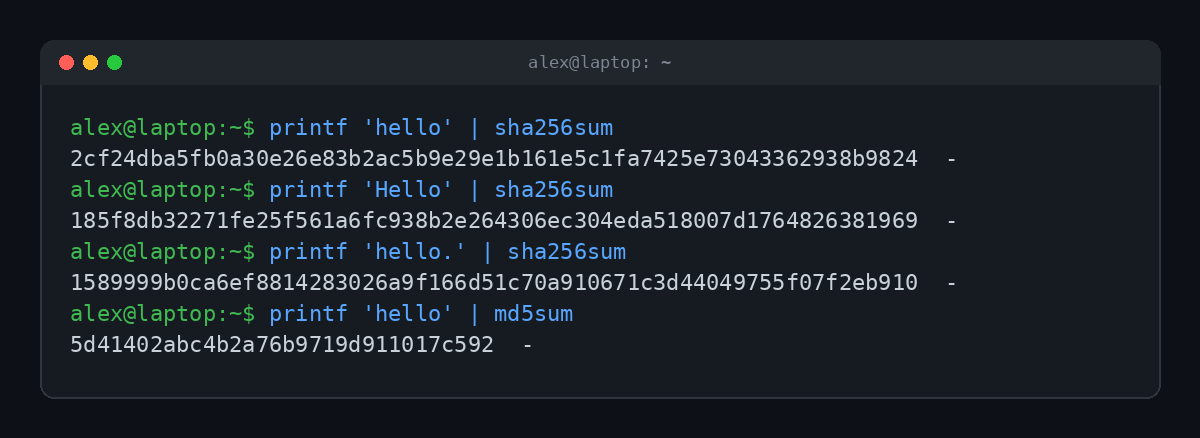
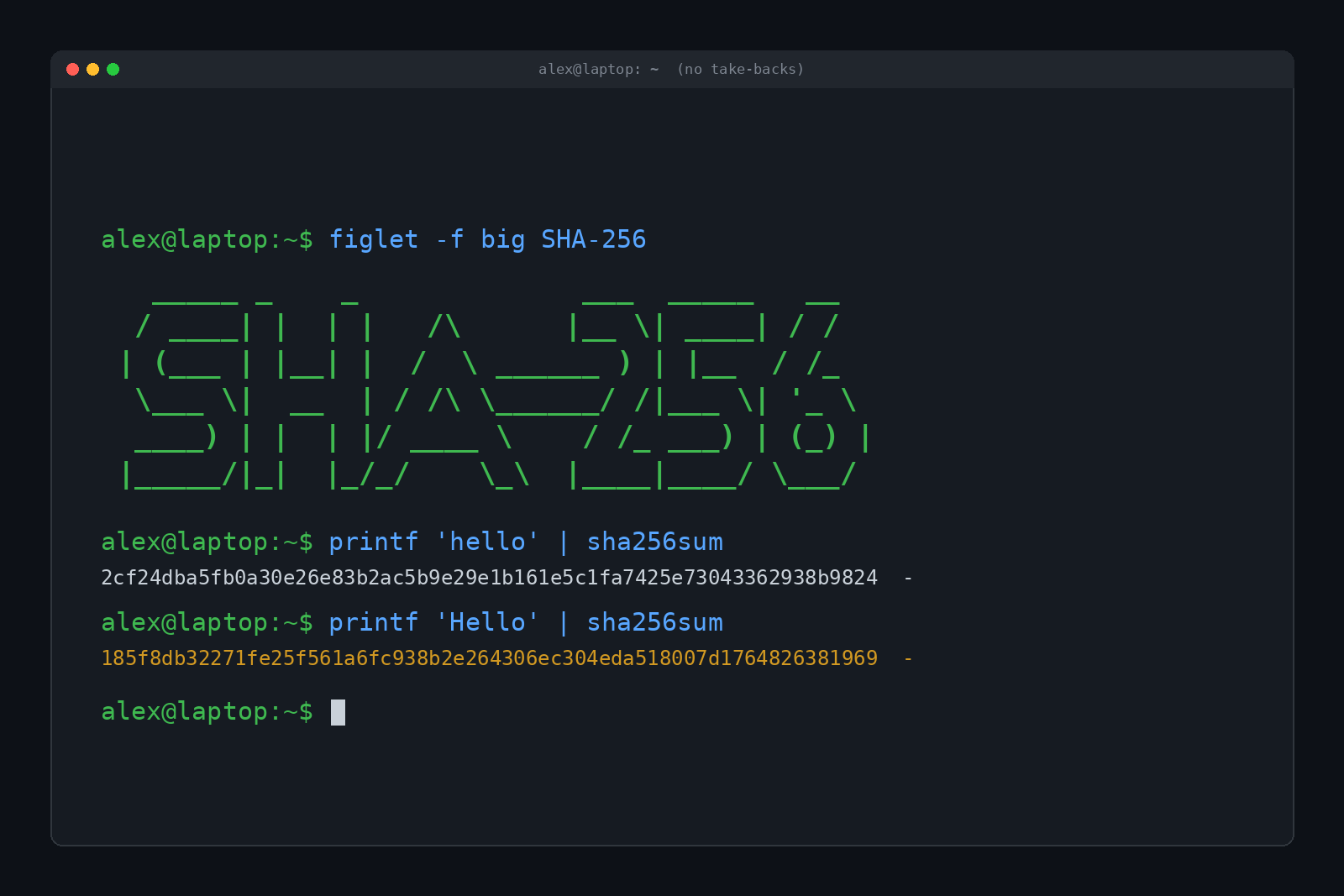
Look at that screenshot. "hello" and "Hello" differ by one capital letter, and their hashes share basically nothing. That's called the avalanche effect, and it's on purpose. If similar inputs produced similar hashes, attackers could play "hot or cold" until they found the original.
The Rules a Good Hash Has to Follow
Not every scrambling function counts. A cryptographic hash, the kind used in security, has to pass a few tests:
- Deterministic. Same input, same hash, every single time, on every computer.
- Fixed size. The output is always the same length, no matter how big the input is.
- One-way. Given a hash, you can't work out the input except by guessing and checking.
- Avalanche effect. Change one bit of input and roughly half the output bits flip.
- Collision resistant. It should be practically impossible to find two different inputs with the same hash.
That last one is where things get spicy. Since there are infinite possible inputs and a finite number of hashes, collisions must exist somewhere. The whole game is making them so hard to find that nobody ever does. When researchers find one on purpose, the algorithm is considered broken.
Hashing vs Encryption: Not the Same Thing
People mix these up constantly, so let's settle it.
Encryption is a locked box. You scramble data with a key, and anyone with the right key can unscramble it. It's built to be reversed.
Hashing is a paper shredder that leaves a receipt. You can't un-shred the document. You can only shred another document and see whether the receipt matches.
And then there's encoding, like Base64, which isn't secret at all. It just repackages data so it survives being sent around. We cover that in what Base64 is (and why it's not encryption).
| Hashing | Encryption | Encoding (Base64) | |
|---|---|---|---|
| Reversible? | No | Yes, with the key | Yes, by anyone |
| Needs a key? | No | Yes | No |
| Output size | Always the same | Grows with the input | About a third bigger than the input |
| Used for | Passwords, file checks, signatures | Keeping secrets secret | Moving data safely |
Where You Run Into Hashes Every Day
You probably use hashing dozens of times a day without noticing. A few of the big ones:
- Password storage. Well-run sites keep a hash of your password, not the password itself.
- Download checks. Software projects publish checksums so you can confirm the file you got is the file they made.
- HTTPS certificates. Digital signatures hash the data first and sign the hash. When your browser shouts "Your connection is not private", a failed signature check is one possible reason.
- Git. Every commit, file and folder in a Git repository is identified by its hash. Those short codes like
a1b2c3dare hashes. - Bitcoin. Mining is basically a giant SHA-256 guessing contest.
- Deduplication. Cloud storage can spot identical files by comparing hashes instead of comparing every byte.
How Hashes Catch Tampered Downloads
Here's the most hands-on use. A project publishes a file plus a list of SHA-256 hashes, usually called SHA256SUMS or a "checksum." You hash your download and compare.
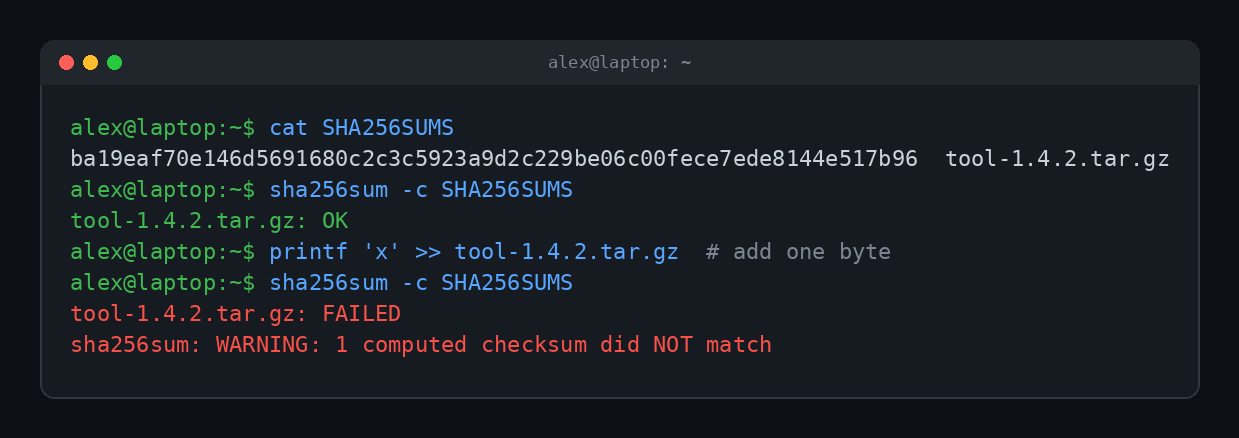
One extra byte in a five-million-byte file, and the check fails. That's the avalanche effect earning its paycheck.
Want to try it yourself? These commands are built in:
- Linux:
sha256sum filename - macOS:
shasum -a 256 filename - Windows (PowerShell):
Get-FileHash filename(SHA-256 is the default)
One catch. A checksum only helps if you get it from somewhere the attacker can't also edit. If someone hacks the download page and swaps both the file and the hash, the numbers will match perfectly. That's why serious projects also sign their checksum files with a cryptographic key.
How Hashing Protects Your Password
When you create an account, a good site runs your password through a hash function and stores only the result. When you log in, it hashes what you typed and compares. The site never needs to know your actual password.
If that database gets stolen, attackers get a pile of hashes, not passwords. They can't reverse them, so they guess instead: hash "password123", compare, hash "letmein", compare, billions of times. We cover the whole playbook in how hackers get passwords.
So two things decide how well a hash protects you: salt and speed.
Salt: why your hash shouldn't match your neighbor's
A salt is a random value added to each password before hashing. Without one, everyone who picked "hunter2" gets the exact same hash, so cracking it once cracks them all. Attackers can also use giant precomputed tables of common passwords and their hashes, known as rainbow tables.
With a unique salt per user, identical passwords produce different hashes, and every account has to be attacked separately. The salt isn't secret. It's stored right next to the hash. Its job is to make every hash unique, not to hide anything.
Speed: the one time slow is a feature
SHA-256 is designed to be fast. That's great for checking a 4 GB download and terrible for passwords, because fast for you means fast for the attacker too.
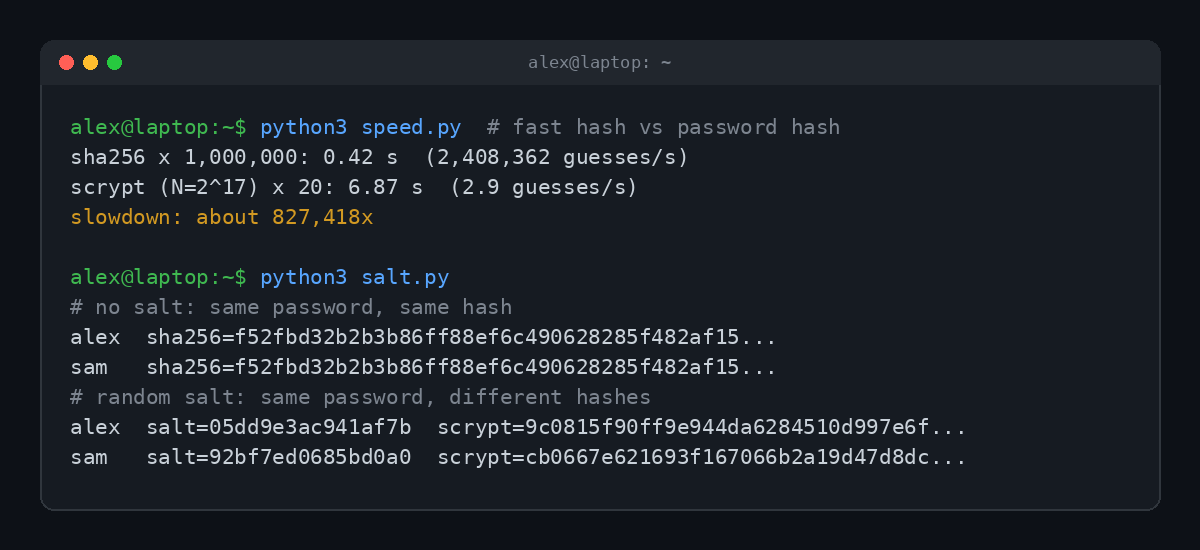
That's one small machine running Python. Real cracking rigs with graphics cards go much, much faster on plain SHA-256. A deliberately slow, memory-hungry password hash like scrypt or Argon2 makes every single guess expensive, which turns "a weekend" into "the heat death of the universe" for a decent password.
The OWASP Password Storage Cheat Sheet, which a lot of developers treat as the rulebook, recommends Argon2id first, then scrypt, with bcrypt for older systems and PBKDF2 when government compliance rules require it. Plain SHA-256 or MD5 on their own aren't on the list for passwords.
MD5, SHA-1 and SHA-256: Which Ones Are Still Safe?
Hash functions age like milk, not wine. Here's where the famous ones stand:
| Algorithm | Hash length | Status |
|---|---|---|
| MD5 | 128 bits (32 hex characters) | Broken for security. Fine for spotting accidental corruption. |
| SHA-1 | 160 bits (40 hex characters) | Broken. Being phased out everywhere. |
| SHA-256 (SHA-2 family) | 256 bits (64 hex characters) | Safe and the everyday default. |
| SHA-3 | 224 to 512 bits | Safe. A different design kept as a backup. |
| Argon2id, scrypt, bcrypt | Varies | Built specifically for passwords. Use these for logins. |
How MD5 fell
MD5 was the go-to hash through the 1990s. In August 2004, researchers demonstrated the first full MD5 collision: two different inputs, one hash. Within months people were using the trick to create colliding digital certificates. By the 2010s, generating MD5 collisions was something a regular computer could do quickly. So when you hear a site "stored passwords in MD5," that's the security equivalent of a padlock made of cheese.
How SHA-1 got SHAttered
SHA-1 hung on longer. Then in February 2017, a team from Google and the Dutch research institute CWI Amsterdam published SHAttered: two different PDF files with the exact same SHA-1 hash. According to the EFF's write-up, it took about nine quintillion SHA-1 computations, the equivalent of roughly 6,500 years of CPU time plus 110 years of GPU time. Expensive, sure. But "expensive" is a budget problem, not a math problem.
NIST officially retired SHA-1 in December 2022 and set December 31, 2030 as the deadline to stop using it in its remaining protocols, recommending SHA-2 or SHA-3 instead.
Git is a good example of how long these migrations take. It was built on SHA-1, and support for SHA-256 repositories already exists. As of late 2026, Git's developers plan to make SHA-256 the default for new repositories in Git 3.0, expected in spring 2027, with code hosting sites still catching up on support.
Can a Hash Be Reversed?
Not mathematically. The function throws information away, so there's nothing to "undo." A 64-character hash can stand in for a 4 GB file, and you can't squeeze a movie back out of 64 characters.
But the sites that claim to "decrypt" hashes aren't lying, exactly. They're cheating. They keep huge databases of common inputs and their hashes, so if you paste in the hash of "password123," they look it up and hand it back. Try that with the hash of a 20-character random password and the lookup comes back empty. That's the whole reason long, random passwords matter.
Quick Answers
What is hashing in simple terms?
Hashing turns any data into a short, fixed-length fingerprint. The same data always gives the same fingerprint, and you can't rebuild the data from it.
Is SHA-256 still secure?
Yes. As of 2026 there's no known practical attack on SHA-256, and it's the standard choice for checksums, certificates and signatures. For storing passwords, use a slow password hash like Argon2id instead.
Is MD5 safe to use?
Not for anything security-related. MD5 collisions are easy to create. It's still fine for catching accidental file corruption, like a bad download.
What's the difference between a hash and a checksum?
A checksum is any short value used to detect changes in data. A cryptographic hash is a checksum strong enough that nobody can fake a match on purpose.
Why do two people's password hashes look different even if they use the same password?
Because good sites add a unique random salt to each password before hashing. Same password, different salt, completely different hash.
TL;DR
Hashing turns any data into a fixed-size fingerprint that can't be reversed. It's how your computer checks downloads, how certificates get signed, and how decent websites store your password without knowing it. SHA-256 is the safe everyday default, MD5 and SHA-1 are broken, and passwords deserve a slow, salted hash like Argon2id.