In movies, a hacker types furiously for ten seconds and announces "I'm in." In real life, most stolen passwords are never guessed at all. They're handed over on a fake login page, leaked in someone else's data breach, or quietly copied off an infected computer.
Here are the seven ways hackers actually get passwords, roughly from most to least common, what genuinely protects you from each one, and exactly what to do if you think one of yours has been stolen.
1. Phishing
Phishing is still the number one way passwords get stolen. You get an email or text that looks like it's from your bank, Microsoft, Netflix or a delivery company. It links to a login page that looks perfect. You type your password, and it goes straight to the attacker.
Modern phishing kits go a step further. They sit invisibly between you and the real site, passing everything back and forth, so you really do log in. Meanwhile they capture both your password and the session that keeps you logged in. That lets them get past text-message codes too.
Common phishing lures include:
- "Your account has been locked. Sign in to restore access."
- "Unusual sign-in activity detected."
- "A document has been shared with you," leading to a fake Microsoft 365 or Google login
- "Your package couldn't be delivered" or "You have an unpaid toll"
- "Your password expires today"
What stops it: never log in from a link in an email or text. Go to the site yourself. A password manager also helps more than you'd think, because it won't autofill your password on a lookalike domain, and that hesitation is your warning sign. Passkeys (more on those below) can't be phished at all.
 Server403
2. Data Breaches and Credential Stuffing
Companies get breached constantly, and the stolen usernames and passwords end up traded and sold online, often in collections with billions of entries. Attackers then feed those lists into tools that try every email and password combination on other sites automatically. That's called credential stuffing.
It works for one reason: people reuse passwords. If the password you used on a hacked forum in 2019 is the same one on your email account today, the forum's breach just became your email breach. And once an attacker has your email, they can reset the passwords on almost everything else you own.
What stops it: a unique password for every account. You can also check whether your email has turned up in known breaches at Have I Been Pwned, a free service run by security researcher Troy Hunt. It also has a password checker that tells you if a password has appeared in a breach, without ever sending your actual password to the site.
3. Infostealer Malware
This is the one that's grown the fastest in the last few years. Infostealers are malware built to do one job: grab every password saved in your browser, plus your logged-in session cookies, crypto wallets and saved card details, and send them off within seconds. Many don't even stick around afterward. They steal everything and delete themselves.
They usually arrive disguised as cracked software, game cheats, fake browser updates, "free" versions of paid apps, or fake CAPTCHA pages that tell you to paste a command into your computer to "prove you're human." That last one is always a scam.
They've been behind some very large incidents. In 2024, attackers used passwords harvested by infostealers to break into a long list of companies' cloud data accounts, mostly ones that didn't have multi-factor authentication turned on.
What stops it: only install software from the official source, keep your system and browser updated, leave Microsoft Defender or your antivirus turned on, and never run a command a website tells you to paste. Turning on multi-factor authentication means a stolen password alone isn't enough.
4. Password Spraying
Instead of trying many passwords on one account, which triggers lockouts, attackers try a few very common passwords on thousands of accounts. Something like Winter2025! or Password1 tried against every employee at a company will almost always hit someone, and it's quiet enough that it often goes unnoticed.
What stops it: don't use passwords that follow obvious patterns, like a season and a year, a sports team plus a number, a company name plus "123," or any word with an exclamation point on the end.
5. Cracking Stolen Password Hashes
Well-run websites don't store your actual password. They store a hash, a scrambled fingerprint of it that can't simply be reversed. When a site's database is stolen, attackers try to crack those hashes offline. They guess a password, hash it, and see if it matches, billions of times per second on powerful graphics cards.
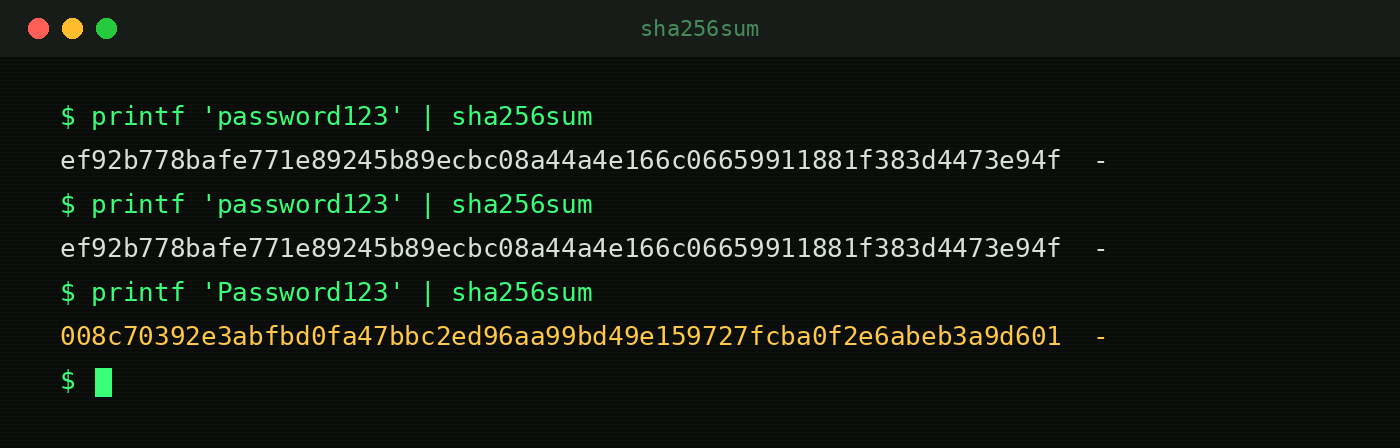
They don't guess randomly. They start with lists of real leaked passwords, then common words with predictable tweaks like P@ssw0rd or a year on the end, and only fall back to trying every combination at the very end. How fast that goes depends heavily on how the site stored the hashes. Older, fast methods like MD5 fall quickly. Slower, modern ones like bcrypt and Argon2 are designed to make every guess expensive.
Why length beats complexity
Here's how many possible passwords an attacker would have to work through for different randomly generated passwords:
| Password type | Possible combinations |
|---|---|
| 8 characters, lowercase only | About 209 billion |
| 4 random words | About 3.7 quadrillion |
| 8 characters, upper, lower, numbers and symbols | About 6.6 quadrillion |
| 12 characters, lowercase only | About 95 quadrillion |
| 5 random words | About 28 quintillion |
| 16 characters, lowercase only | About 44 sextillion |
| 6 random words | About 221 sextillion |
| 12 characters, upper, lower, numbers and symbols | About 540 sextillion |
Random words assume a standard 7,776-word list like the EFF's Diceware list.
Notice that a 12-character lowercase password beats an 8-character password with every type of symbol, and a 16-character lowercase one beats it by millions of times over. Each extra character multiplies the work. Security firm Hive Systems publishes a yearly password cracking table that turns numbers like these into time estimates using the latest graphics cards.
One huge caveat: those numbers only apply to passwords that are truly random. A password a human picked, like Fluffy2019!, gets cracked in seconds no matter how long it is, because it's on the attacker's list of likely guesses.
What stops it: length and randomness. A password manager can generate a 20-character random password, and for the few you have to remember, a passphrase of five or six random words is both strong and memorable.
6. Keyloggers
A keylogger records everything you type and sends it to an attacker. It can be software hidden on your computer, often bundled with other malware, or, rarely, a tiny physical device plugged in between a keyboard and a shared computer. It's a bigger risk on public or shared machines, like library or hotel computers, than on your own.
What stops it: avoid logging into anything important on computers you don't control, keep your own devices updated, and use multi-factor authentication so a captured password isn't enough on its own. Password managers that autofill instead of making you type help here too.
7. Guessing and Social Engineering
Some passwords are just easy to guess from what people share online: a pet's name, a kid's birthday, a favorite team, a street you grew up on. Others are handed over to someone calling "from IT" or "from the bank" who sounds convincing and creates a sense of urgency. Security questions are just as weak, since the answers are often on social media or public records.
What stops it: random passwords from a password manager, and never giving a password or one-time code to anyone who contacts you first. Real companies don't ask for them. For security questions, use random answers and save them in your password manager.
 Server403
What Actually Protects You
The good news is that a handful of habits block almost everything above.
Use a password manager
It creates a long, random, unique password for every account and remembers them for you. You only have to remember one strong master password. Good options include Bitwarden (which has a solid free plan), 1Password and Proton Pass, and the managers built into Apple devices, Google and modern browsers are far better than reusing passwords.
Getting started is less work than it sounds:
- Pick one and install it on your computer and phone.
- Create a strong master password, ideally five or six random words. Write it down and keep it somewhere safe at home until you've memorized it.
- Turn on multi-factor authentication for the password manager itself.
- Import your browser's saved passwords, then turn off your browser's own password saving so everything lives in one place.
- Fix the important accounts first: email, banking, your Apple or Google account, and anything with payment details. Change each to a new generated password.
- Update the rest as you go. Each time you log into an old account, let the manager generate a new password.
Follow the modern password rules
The rules most of us learned at work are outdated. The latest guidance from NIST, the US agency whose password standards most organizations follow, was finalized in 2025 and says:
- Length matters most. At least 15 characters when a password is the only thing protecting an account.
- No forced complexity rules. Requiring a capital, a number and a symbol mostly produces predictable passwords like
Summer2025!. - No forced changes on a schedule. Change a password when there's a sign it's been compromised, not every 90 days.
- Check against breached passwords. Systems should reject passwords already known to be leaked.
- Allow password managers and pasting. Sites shouldn't block the tools that make strong passwords practical.
Turn on multi-factor authentication
Multi-factor authentication (MFA) means a stolen password alone isn't enough. Not all methods are equal, though:
| Method | Strength | Weak spot |
|---|---|---|
| Text message codes | Better than nothing | SIM swapping and phishing kits can grab the code |
| Email codes | Better than nothing | Only as safe as your email account |
| Authenticator app codes | Strong | A convincing phishing page can still capture a code |
| Push approval prompts | Strong, if number matching is on | Attackers spam prompts hoping you tap "approve" |
| Passkeys and hardware security keys | Strongest | Won't work on fake sites, so they can't be phished |
If you ever get an MFA prompt you didn't trigger, deny it. It means someone has your password, so change it right away.
Switch to passkeys where you can
Passkeys replace the password entirely. Your device holds a secret key, and you unlock it with your fingerprint, face or PIN. Because a passkey is tied to the real website's address, a phishing page can't use it, and there's no password sitting in a database to leak. Google, Apple, Microsoft, Amazon, PayPal and a fast-growing list of other sites support them.
To set one up, look in an account's security settings for "passkeys" or "sign in without a password," and follow the prompts. Passkeys sync through your Apple, Google or Microsoft account or your password manager, so a new phone doesn't mean starting over.
Be careful on public Wi-Fi
Almost every site uses encrypted HTTPS now, so public Wi-Fi is far less risky for passwords than it used to be. But fake hotspots and fake login pages are still a thing. A VPN adds a layer of protection when you're on networks you don't trust.
What to Do If You Think a Password Was Stolen
- Change it right away, from a device you trust, to a new random password.
- Change it anywhere else you reused it. This is where reuse really hurts.
- Sign out of all other sessions. Most major services have a "sign out everywhere" option in their security settings. This kicks out an attacker who stole your session cookie.
- Turn on multi-factor authentication if it wasn't on already.
- Check for changes an attacker may have made: forwarding rules in your email, new recovery phone numbers or email addresses, new devices, or connected apps you don't recognize.
- Watch your financial accounts, and consider freezing your credit with the three major bureaus if personal information was exposed. It's free and doesn't affect your credit score.
- Scan your computer with your antivirus if you think malware was involved, and change your passwords from a different, clean device.
Frequently Asked Questions
How long should a password be?
At least 15 characters for anything important, per NIST's latest guidance. Longer is better. If a password manager is generating it, 20 or more random characters costs you nothing.
Are password managers safe to use?
Yes, for nearly everyone they're much safer than the alternative, which is usually reusing passwords. Reputable managers encrypt your vault so the company itself can't read it. Protect yours with a strong master password and multi-factor authentication.
Is it safe to let my browser save passwords?
It's far better than reusing passwords, and browser managers have improved a lot. The main risk is infostealer malware, which specifically targets passwords saved in browsers. A dedicated password manager plus up-to-date antivirus gives you a bit more protection.
How often should I change my passwords?
Only when there's a reason to, like a breach, a suspicious login or a phishing scare. Forced changes on a schedule tend to produce weaker, predictable passwords.
What does "pwned" mean?
It's hacker slang for "owned," meaning beaten or compromised. Have I Been Pwned uses it to tell you whether your email address has shown up in a data breach.
TL;DR
Hackers rarely guess passwords. They phish them, buy them from data breaches, steal them with malware, or try common ones across thousands of accounts. A password manager with a long, unique password for every site, multi-factor authentication through an app or a passkey, and a healthy suspicion of login links will stop the overwhelming majority of attacks. And if one does get stolen, change it everywhere it was used and sign out every other session.