You're setting up a game server, or a printer, or some app on your laptop, and the instructions casually say "make sure port 8080 is open." Port? What port? Your laptop has two USB holes and a headphone jack, and none of them are numbered 8080.
Short answer: a port number is a number from 0 to 65,535 that tells a computer which program should get a piece of network traffic. The IP address gets data to the right machine. The port number gets it to the right app on that machine. Websites use port 443 (and old-school plain HTTP uses port 80), SSH uses port 22, and DNS uses port 53.
That's the whole idea. But ports explain a surprising amount of internet weirdness, from why your router has a "port forwarding" page to why hackers love "scanning" things. So let's open a few doors.
What Is a Port Number, in Plain English?
Think of a computer as an apartment building. The IP address is the street address. It gets the delivery driver to the right building. But the building has thousands of units, and the package is for one specific tenant. The port number is the apartment number.
On a real computer, those "tenants" are programs. Your web browser, your email app, a game, a background updater and a chat app might all be talking to the internet at the same moment, over the same Wi-Fi, from the same IP address. Ports are how the computer keeps all those conversations from getting mixed up.
A few quick facts to anchor things:
- Ports are software, not hardware. A network port has nothing to do with the physical ports on your laptop. It's just a number the operating system uses for bookkeeping.
- The range is 0 to 65,535. That's every number that fits in 16 bits. Port 0 is reserved and not used for real services, so in practice you have 65,535 usable ones.
- TCP and UDP each get their own set. These are the two main ways data travels across the internet. TCP is the careful one that checks everything arrived (web pages, email). UDP is the fast one that doesn't wait around (video calls, games, DNS lookups). TCP port 53 and UDP port 53 are technically two different doors.
- An address plus a port is a "socket." When you see something written like
127.0.0.1:8080, that's an IP address, a colon, and a port number.
Here's the apartment building idea, running for real on one machine. Two tiny web apps live at the same address, 127.0.0.1, but on different ports:
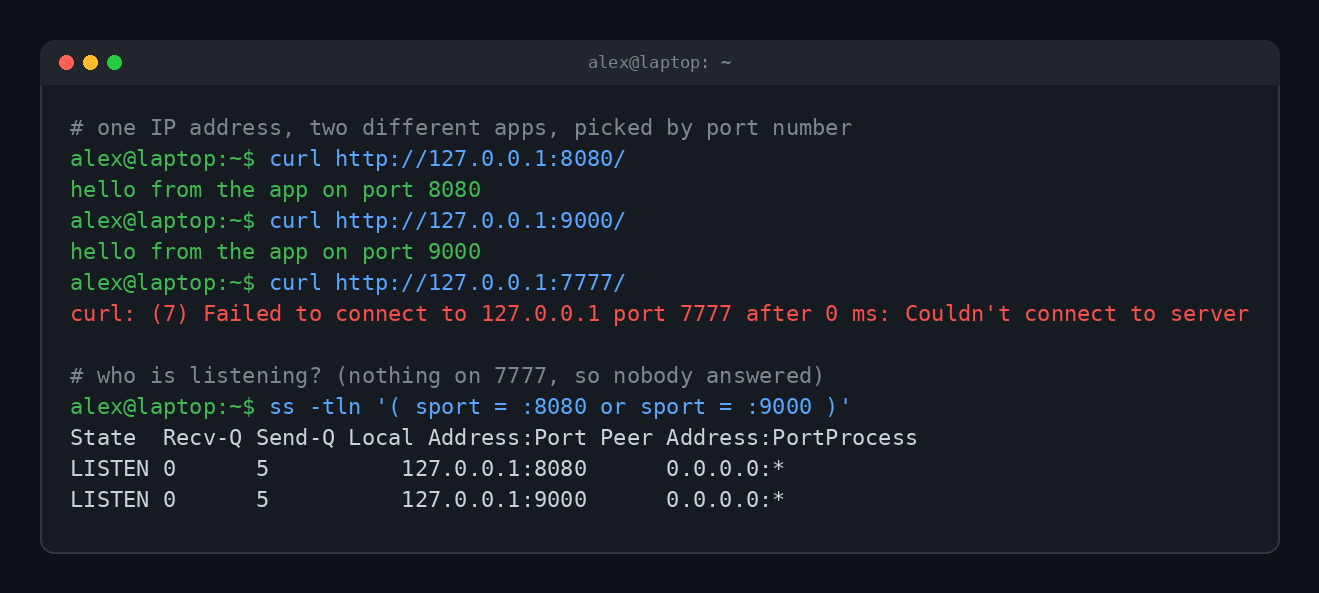
Same building, different apartments, different tenants. And when you knock on an apartment where nobody lives (port 7777 here), you get "connection refused." If 127.0.0.1 looks unfamiliar, it's your own computer talking to itself, and we explained it in What Is 127.0.0.1? Localhost, Explained.
Common Port Numbers You'll Actually Run Into
Some ports are so standard that software assumes them automatically. When you type a website address, your browser quietly uses port 443 without asking. You never see it because it's the default, the same way you don't dial your own country code for a local call.
Here are the ones worth recognizing:
| Port | Protocol | What it's for |
|---|---|---|
| 20, 21 | FTP | Old-school file transfers |
| 22 | SSH | Secure remote login to another computer |
| 25 | SMTP | Mail servers passing email to each other |
| 53 | DNS | Turning names like example.com into IP addresses |
| 80 | HTTP | Unencrypted websites |
| 123 | NTP | Keeping your clock in sync |
| 443 | HTTPS | Encrypted websites (almost all of them now) |
| 587 | SMTP submission | Your email app sending outgoing mail |
| 3389 | RDP | Windows Remote Desktop |
| 8080 | HTTP alternate | Test servers and web apps that can't use 80 |
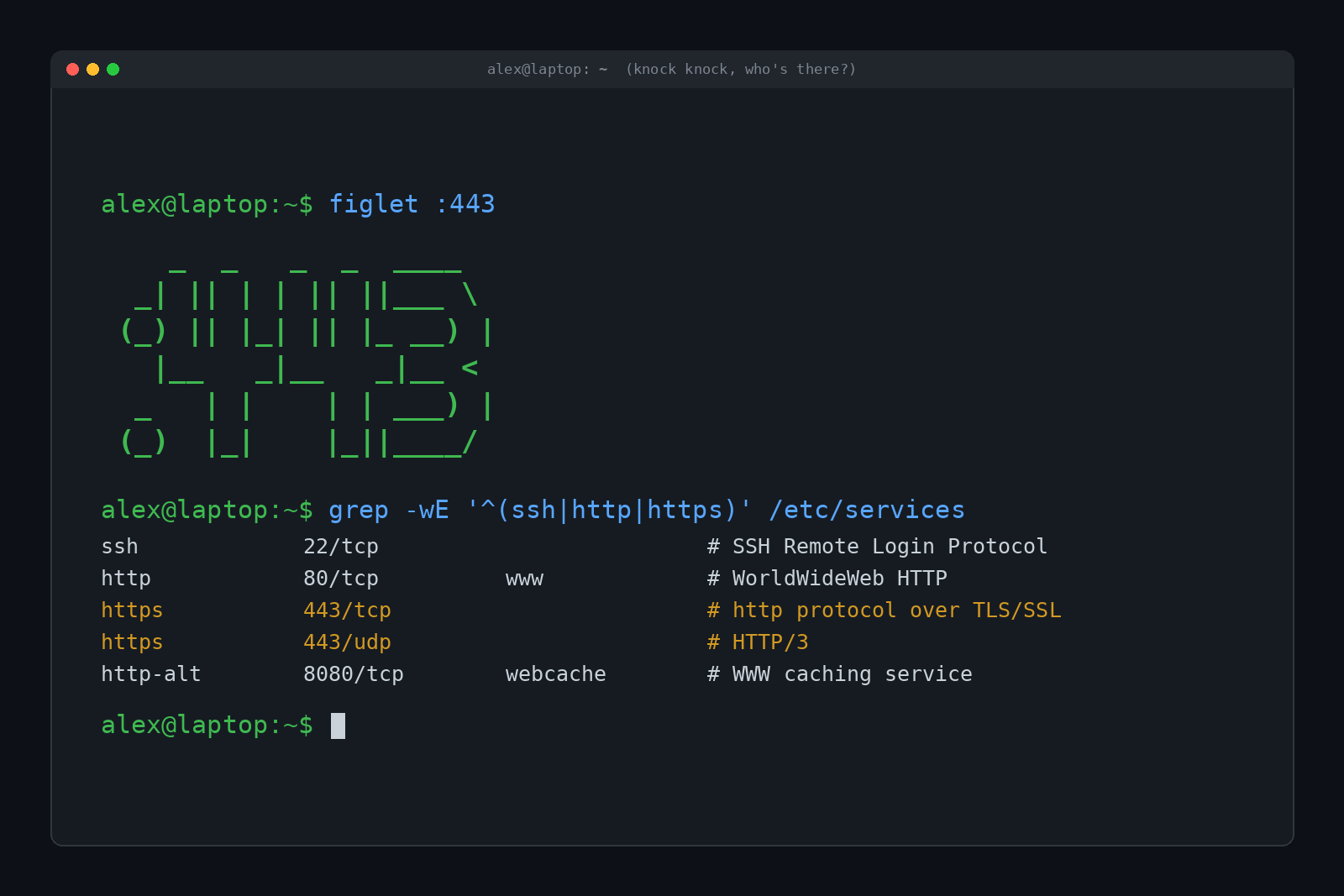
You don't have to memorize that. Your computer already has a cheat sheet. On Linux and macOS it lives in a plain text file called /etc/services, and Windows keeps one at C:\Windows\System32\drivers\etc\services:
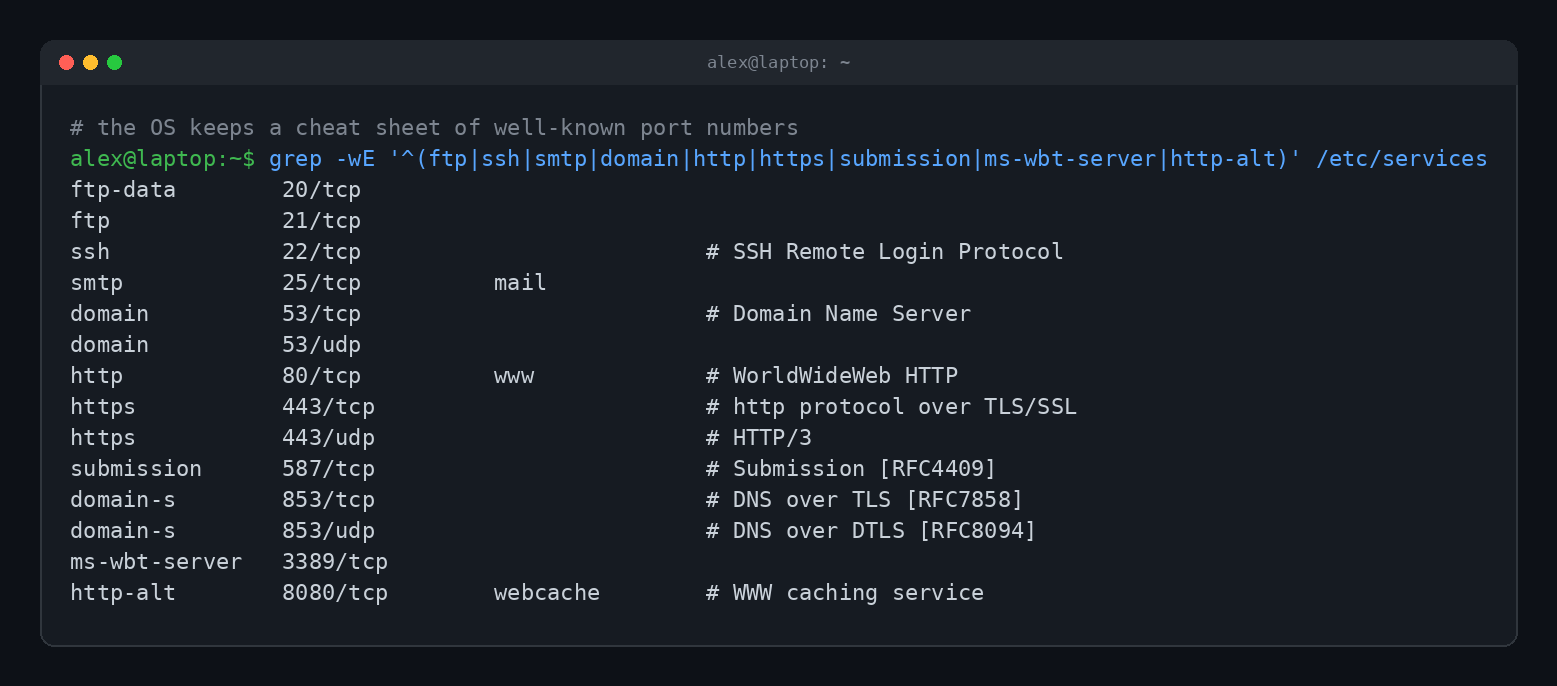
Notice that https shows up twice, once for TCP and once for UDP. That UDP line is for HTTP/3, the newer version of the web protocol that runs over UDP to load pages faster. Same port number, different transport.
Also notice the file is just a list of names. It doesn't control anything. A program can listen on any port it wants. Port 443 is "for HTTPS" because everyone agreed to it, not because the computer enforces it.
Who Decides Which Port Does What?
Someone has to keep the master list, or every app would fight over port 80. That someone is IANA, the Internet Assigned Numbers Authority, the same group that keeps track of IP address blocks and top-level domains like .com.
The job has a fun backstory. In December 1972, back when the internet was still the ARPANET, Jon Postel and Nancy Neigus published RFC 433, a "Socket Number List." Its opening line says "the czar of socket numbers" has established the following assignments. The czar was Postel himself, a UCLA grad student who kept track of the internet's numbers more or less by hand for decades. That role eventually grew into IANA.
Today the rules are spelled out in RFC 6335 (2011), which splits the 65,536 numbers into three neighborhoods:
- System ports, 0 to 1023. Also called "well-known ports." These are the famous ones: 22, 53, 80, 443. IANA hands them out carefully because there aren't many.
- User ports, 1024 to 49151. Also called "registered ports." Software makers can register one for their app. Port 3389 for Remote Desktop lives here.
- Dynamic ports, 49152 to 65535. Also called "private" or "ephemeral" ports. IANA never assigns these. They're free for temporary use, which turns out to matter a lot (more on that in a second).
On Linux and macOS, there's one more wrinkle. Ports below 1024 are traditionally "privileged," meaning a normal program can't listen on them without admin rights. That's why test servers love port 8080. It's like port 80, but you don't need sudo to use it.
So why 80 and 443 specifically?
Honest answer: they were open numbers when the protocols needed them. Port 80 was claimed for the web early in its life, and 443 followed for encrypted web traffic once HTTPS came along. You'll find tidy origin stories online about why those exact numbers were picked. None of them are well documented, so treat them as folklore. The official record is simply that IANA lists them, and the HTTP standard (RFC 9110) names 80 and 443 as the defaults.
How Ports Work in a Real Connection
Here's the part most explainers skip. Every connection has two ends, and both ends have a port.
When your browser connects to a website, the server's side is port 443. But your side needs a port too, so the reply can find its way back to the right browser tab. Your operating system grabs a random temporary number for that, called an ephemeral port, and throws it away when the connection closes.
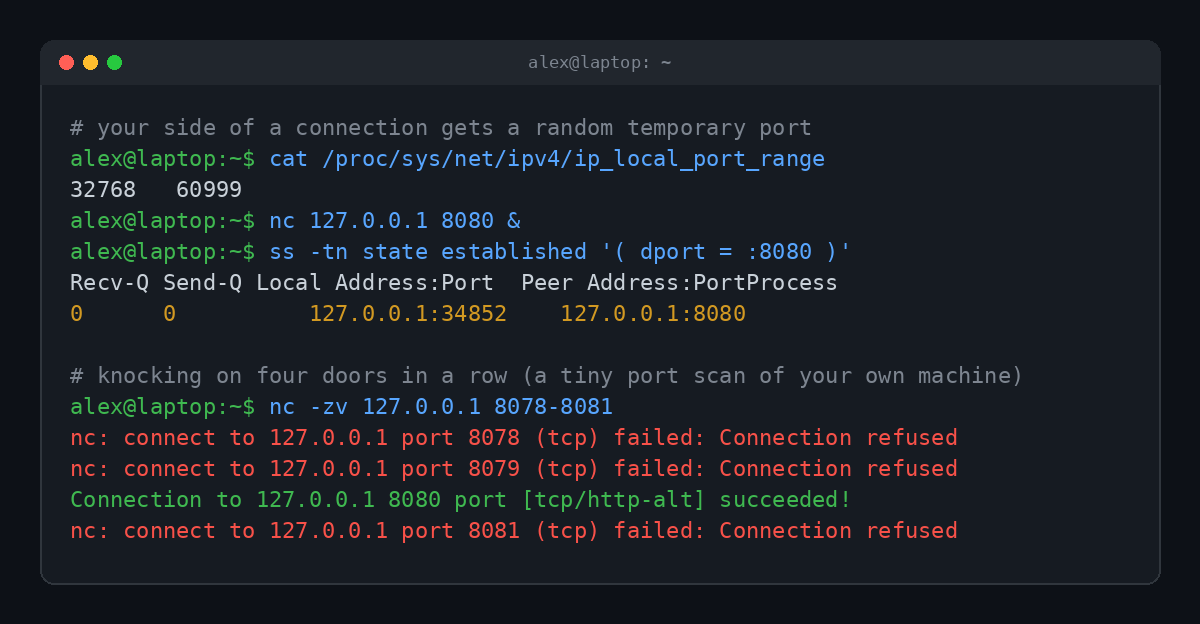
In that shot, the connection runs from port 34852 on one end to port 8080 on the other. Nobody chose 34852. The operating system picked it from its ephemeral range. On this Linux machine that range is 32768 to 60999. Windows Vista and every version since use 49152 to 65535 by default, which matches IANA's recommendation, according to Microsoft's documentation.
This is why you can have 40 browser tabs open on the same site without chaos. Each connection gets its own temporary port on your end, so the replies never land in the wrong tab. For the full trip a web request takes, from typing the address to seeing the page, see What Happens When You Type a URL Into Your Browser?
What Does "Open Port" Mean? Is It Dangerous?
A port is open when a program is listening on it and accepts connections. It's closed when nothing is listening, so you get "connection refused." And it's filtered when a firewall silently drops the knock, so you get no answer at all.
Is an open port dangerous? By itself, no. A port is just a door. The question is what's behind it.
- A web server on 443 that's patched and meant to be public? That's the whole point. Totally fine.
- A forgotten database, an old Remote Desktop login on 3389, or a smart camera with its default password? That's a door into your house with a "come in" sign on it.
Attackers run automated port scans across the whole internet around the clock, knocking on common doors to see who answers. That bottom half of the screenshot above is a tiny version: knock on four ports, one answers. Real scanners do the same thing millions of times an hour. (Only scan machines you own or have permission to test. Scanning other people's stuff can get you blocked, banned or worse.)
That's why firewalls block almost everything by default and only allow the few ports that are actually needed. Your home router does this too. It's also why you shouldn't trust random networks with sensitive stuff. The guy at the next table on coffee shop Wi-Fi is on the same network as your laptop, poking at the same doors.
What Is Port Forwarding?
Your home router has one public IP address, but your house is full of devices. When something from the internet knocks on your router's door, the router has no idea which device inside should get it, so by default it ignores the knock.
Port forwarding is a rule that says "anything arriving on port X goes to this specific device inside." Gamers use it to host matches. People use it to reach a home server or security camera from outside.
It works, but every forwarded port is a door you just opened to the whole internet, scanners included. Forward only what you need, keep the software behind it updated, and close it when you're done. Using a secure protocol helps a lot here, which is part of why people reach remote machines through SSH instead of older, unencrypted tools.
How to See Which Ports Are Open on Your Computer
Curious what's listening on your own machine? You can check in a few seconds.
Windows (open PowerShell or Command Prompt):
netstat -ano | findstr LISTENINGThe last column is the process ID, which you can match up in Task Manager on the Details tab. PowerShell also has a tidier version:
Get-NetTCPConnection -State ListenTo test whether a remote site answers on a specific port:
Test-NetConnection example.com -Port 443macOS and Linux (open Terminal):
ss -tln            # Linux
lsof -iTCP -sTCP:LISTEN -n -P   # macOS or Linux
nc -zv example.com 443
Don't panic when you see a long list. Your operating system, your browser, chat apps and printer software all listen on something. What matters is whether those ports are reachable from outside, and your firewall and router handle most of that.
FAQ
Is a port number the same as an IP address?
No. The IP address identifies the computer. The port number identifies the program on that computer. You need both to reach a specific service, written like 203.0.113.10:443.
How many ports are there?
65,536 numbers per protocol, from 0 to 65,535, and TCP and UDP each have their own full set. Port 0 is reserved, so 65,535 are usable.
What is port 443 used for?
HTTPS, the encrypted version of the web. Almost every website you visit uses it. Newer HTTP/3 connections use UDP port 443 instead of TCP.
Should I close open ports on my computer?
Close or block anything you don't recognize or don't use, especially ports forwarded on your router. Ports used by your operating system and apps on your own machine are normal, and your firewall keeps most of them away from the internet.
Can I change which port a program uses?
Usually, yes. Most server software lets you pick a port in its settings. Clients then need to know the new number, which is why you sometimes see addresses like example.com:8443.
TL;DR
A port number is the apartment number to an IP address's street address: it tells a computer which program should get the traffic. There are 65,536 per protocol, split into well-known (0 to 1023), registered (1024 to 49151) and temporary (49152 to 65535) ranges, all tracked by IANA since the days of Jon Postel, the "czar of socket numbers." Open ports aren't scary on their own. What's listening behind them is what counts.