You're following a coding tutorial. It tells you to start the app and "open localhost:3000 in your browser." You do, and a website appears. A website that lives... where, exactly? Nobody bought a domain. Nothing got uploaded. And yet there it is.
Short answer: 127.0.0.1 is the IP address every computer uses to talk to itself. Its nickname is localhost. Anything you send to 127.0.0.1 never leaves your machine. It goes out one software door and straight back in another, which makes it the safest, fastest and most boring network destination on the planet.
That's also why the nerdiest doormat in history says "There's no place like 127.0.0.1." Here's what the address does, why the number is 127, and how a self-proclaimed hacker once took it personally.
What Is 127.0.0.1, in Plain English?
Every device on a network gets an IP address so other devices can find it. Your laptop has one on your home Wi-Fi, something like 192.168.x.x. Websites have public ones. Think of them as street addresses for computers.
127.0.0.1 is different. It isn't the address of any particular computer. It's a special address that always means "this computer, the one you're on right now." Type it on your laptop and you reach your laptop. Type it on a server in a data center and you reach that server. Same number, different home every time.
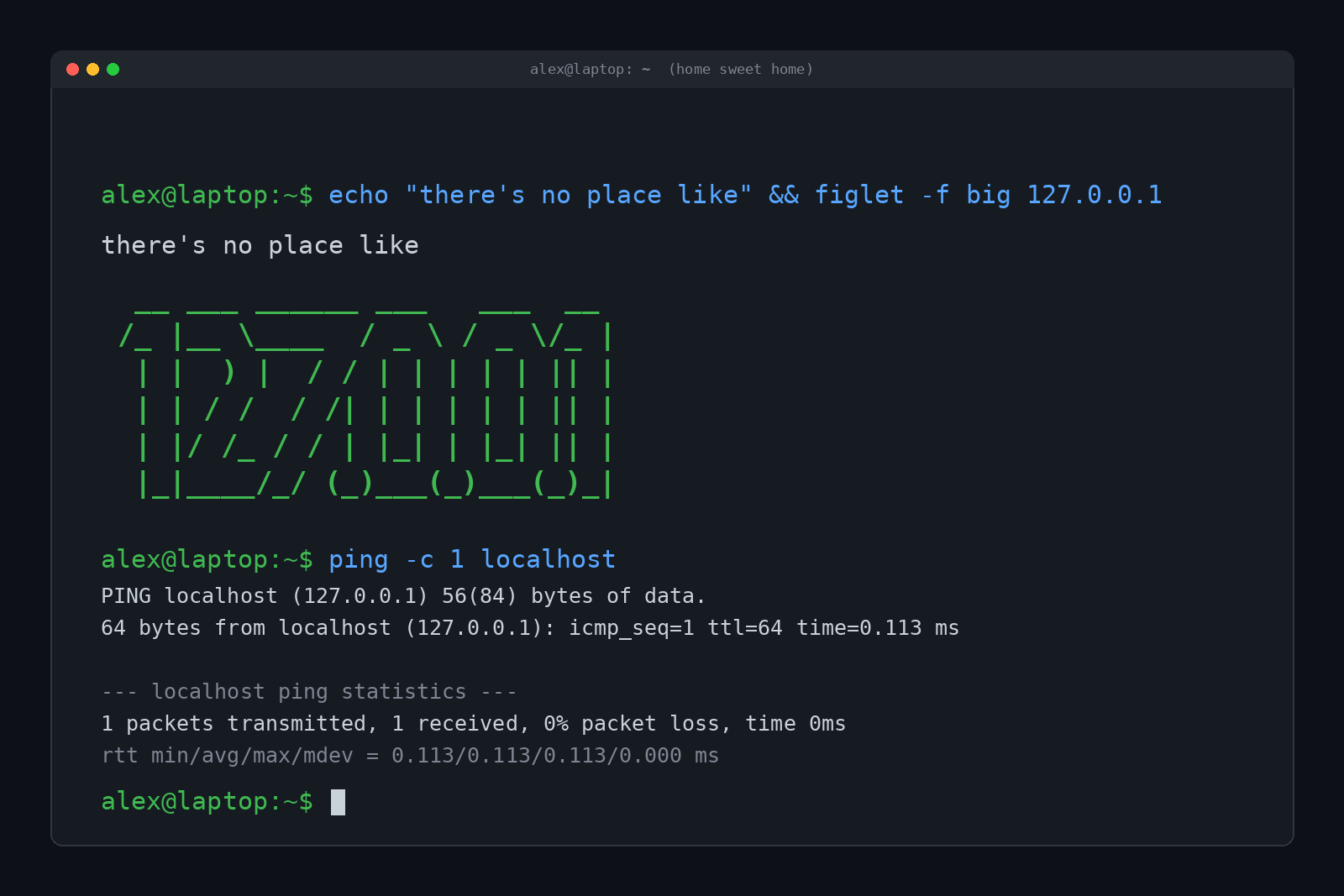
The technical name is the loopback address. Your operating system has a fake network card built into it, called the loopback interface (on Linux it shows up as lo). It has no cable, no antenna and no hardware at all. Packets sent to it loop right back to the same machine. You can ping it like any other address, and you can try a random address from the same block while you're at it:
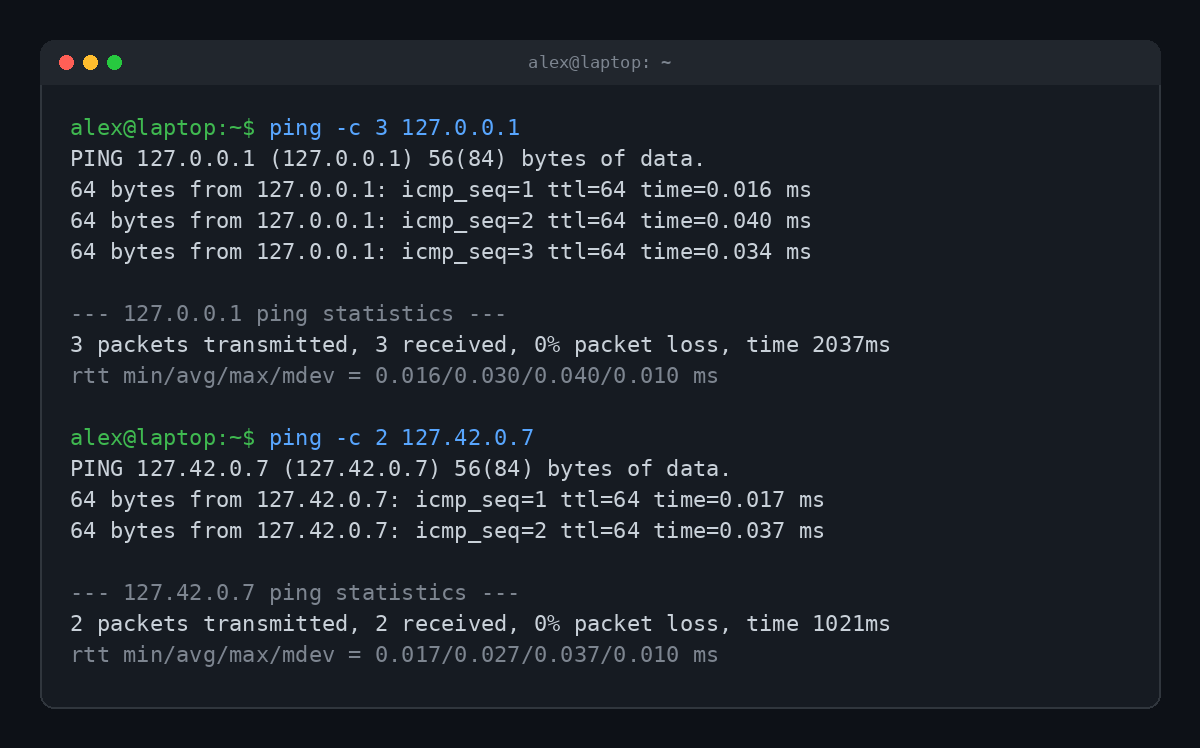
Look at those times: a few hundredths of a millisecond. A ping to a real website usually takes somewhere in the tens of milliseconds, because the packet actually travels. Loopback traffic doesn't travel anywhere, so it's basically instant. It also works with your Wi-Fi turned off and the router unplugged.
Localhost vs 127.0.0.1: Are They the Same Thing?
Almost. localhost is a name. 127.0.0.1 is a number. Your computer translates the name into the number, the same way it translates "example.com" into an IP address, except it never has to ask the internet.
On Linux and macOS, that translation traditionally lives in a small text file called the hosts file (/etc/hosts), which has a line pointing localhost at 127.0.0.1. Here's the loopback interface and the lookup on a Linux machine:
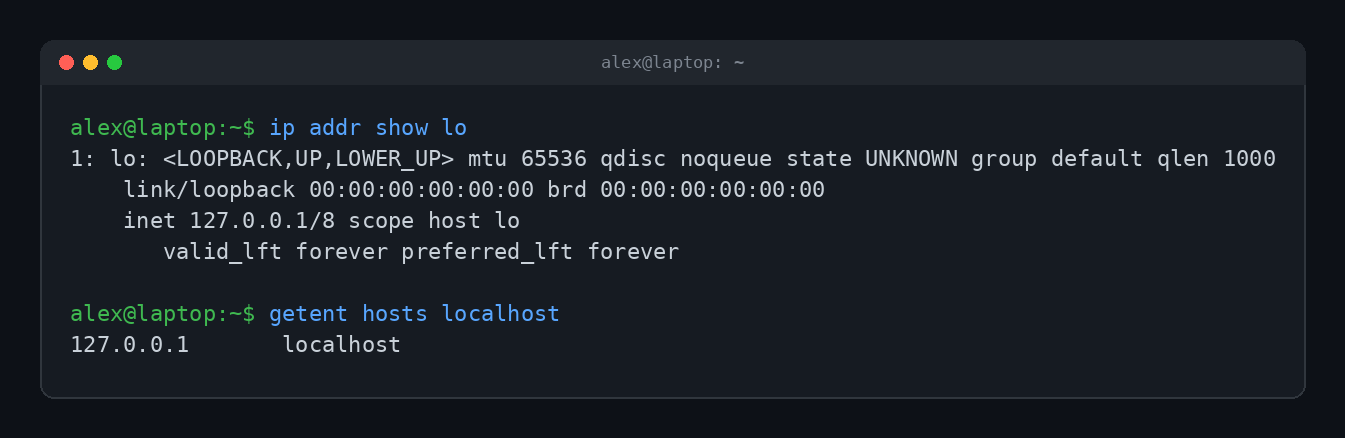
On Windows the hosts file lives at C:\Windows\System32\drivers\etc\hosts, but on modern versions the localhost lines are commented out with a note saying name resolution for localhost is handled within DNS itself. Same result, different plumbing.
There are a few small differences worth knowing:
- localhost can mean IPv6 too. The newer IPv6 system has its own loopback address,
::1. Depending on your setup, "localhost" might resolve to ::1 first. That's why an app that only listens on 127.0.0.1 can occasionally act strange when you visit "localhost" instead. - The name is officially reserved. RFC 6761, published in 2013, says software should treat "localhost" as special and always answer with a loopback address. Some tools now hard-code it. Since version 7.78.0 in 2021, curl resolves localhost on its own instead of trusting your hosts file or DNS, according to curl's creator, Daniel Stenberg.
- The number can't be hijacked by a hosts file. If someone edits your hosts file, "localhost" could theoretically point somewhere else. 127.0.0.1 is always 127.0.0.1.
Why 127? Of All the Numbers?
Here's the fun part: nobody wrote down a great reason.
In the early 1980s, IPv4 addresses were split into big "classes." The very first and very last Class A networks, 0 and 127, were held back. RFC 790 from 1981 already lists 127 as reserved. Then RFC 990, published in November 1986, made it official: "The class A network number 127 is assigned the 'loopback' function." A datagram sent to network 127 should loop back inside the host.
Network 0 already had a job, and network 1 had been handed to an early packet radio network. So 127 was free. That's about as much official history as exists. The popular theory is that 127 (01111111 in binary) is easy to spot and cheap for old processors to check. It sounds right, but treat it as folklore, not fact.
What's definitely true is that the reservation was generous. The whole 127.0.0.0/8 block is loopback, which is 16,777,216 addresses. Every single one of them points at your own computer. On Linux you can ping one at random, like 127.42.0.7 in the screenshot above, and it still answers.
(macOS is stingier. Out of the box it only answers on 127.0.0.1, and you have to add an alias to use the others.) Over 16 million addresses for one computer to talk to itself is easily the biggest real estate waste in internet history, and network engineers love to grumble about it.
The rules also say these addresses must never escape. RFC 1122, the 1989 rulebook for internet hosts, says loopback addresses "MUST NOT appear outside a host." Routers are supposed to drop them on sight. That's what makes loopback safe.
What Is Localhost Actually Used For?
If 127.0.0.1 just talks to itself, why does anyone care? Because "talking to yourself over a network" turns out to be incredibly useful.
1. Building and testing websites
This is the big one. Developers run a website on their own machine and open it in a browser at localhost before anyone else sees it. Here's a tiny web server started with one line of Python, then visited with curl:
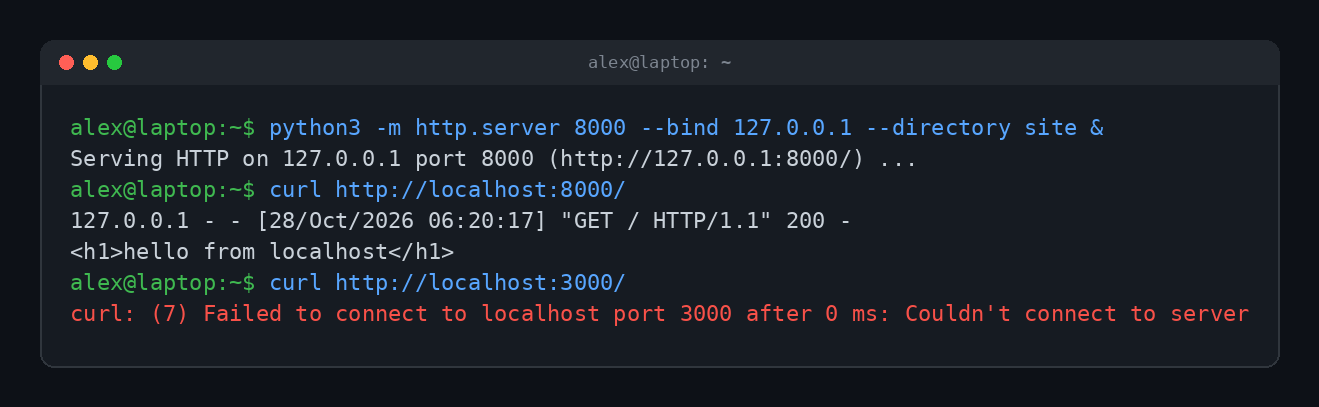
The number after the colon is the port, which is like an apartment number inside the building. One computer can run lots of services at once, each on its own port. Some you'll see constantly:
| Address | Usually means |
|---|---|
localhost:3000 | A Node.js, React or Rails dev server |
localhost:5173 | A Vite dev server |
localhost:8000 | Python's built-in server, Django |
localhost:8080 | The classic "alternate web" port, Java apps, lots of Docker examples |
localhost:5432 | A PostgreSQL database |
localhost:3306 | A MySQL database |
Notice that last curl line. "Couldn't connect" (often shown as connection refused, or ERR_CONNECTION_REFUSED in Chrome) on localhost almost always means one thing: nothing is listening on that port. Your app crashed, never started, or is running on a different port. Check the terminal where you started it. It's rarely a networking problem, since there's no network involved.
Containers use the same trick. When you run something in Docker and map a port, you open it at localhost. (Our plain-English guide to Docker walks through exactly that.)

2. Running databases and tools privately
A database that only listens on 127.0.0.1 can be used by apps on the same machine but can't be reached from outside at all. That's a simple, effective security habit.
3. Testing your own network stack
If you can ping 127.0.0.1, your computer's networking software is at least alive. If you can't, something is badly broken locally, and blaming your internet provider won't help.
4. Blocking websites with the hosts file
Point a domain at 127.0.0.1 (or 0.0.0.0) in your hosts file, and your computer will look for that site on itself, find nothing, and give up. People use this to block ads, trackers and distracting sites. It's crude, but it works.
127.0.0.1 vs 0.0.0.0: The One That Trips People Up
When you start a server, you choose which address it listens on, and these two look similar but act very differently:
- 127.0.0.1 means "only accept connections from this same computer." Your phone on the same Wi-Fi can't see it.
- 0.0.0.0 means "listen on every network interface." Other devices on your network can connect too, if your firewall allows it.
So if your site works on your laptop but your phone can't load it, your server is probably bound to 127.0.0.1. And if you didn't mean to share something with the whole coffee shop Wi-Fi, check that it isn't bound to 0.0.0.0.
The Hacker Who Hacked Himself (Folklore Alert)
No 127.0.0.1 story is complete without this one. According to Know Your Meme, in April 2005 a German hip hop site posted a chat log from its IRC channel. A user threatened to hack another user, who calmly replied with his "IP address": 127.0.0.1.
The would-be attacker then announced each devastating attack, and each time his own computer crashed or disconnected. He was attacking himself. Repeatedly. With confidence.
The log was translated to English days later, hit Slashdot on April 27, 2005 as "The Planet's Most Moronic Hacker," and has been passed around ever since. Even back then, people questioned whether it was real or staged, so file it under internet folklore. True or not, "my IP is 127.0.0.1, go ahead" became one of the oldest pranks in hacker culture. It's the IT equivalent of handing someone a mirror and saying "the culprit is right there."

"There's No Place Like 127.0.0.1"
The other classic is a pun on Dorothy's line from The Wizard of Oz (1939): "There's no place like home." Since 127.0.0.1 is your computer's home address, swapping it in turns a movie quote into a nerd password. It's been printed on shirts, mugs and doormats, and it was already bouncing around tech forums by the early 2000s. Nobody knows who said it first. It's one of those jokes that seems to have been invented in a hundred server rooms at once.
There's an IPv6 version too, "There's no place like ::1," but it hasn't caught on. Much like IPv6 itself.
Is 127.0.0.1 Safe? Can Someone Hack Me Through It?
Mostly, yes, it's safe. Nobody on the internet can send traffic to your 127.0.0.1, because to them 127.0.0.1 means their own computer. That's the whole joke behind the IRC story.
The realistic risks are local. Malware already running on your computer can talk to services on localhost, and a malicious web page can sometimes try to poke at services running on your localhost through your own browser. Browsers have been tightening rules around that for years. The practical advice: don't leave old dev servers and admin tools running when you aren't using them, and give local databases real passwords even if they only listen on 127.0.0.1.
If you want to see how your browser turns a normal address into an actual website, we covered the full trip in what happens when you type a URL into your browser. Localhost just skips most of the steps.
Quick Answers
Is 127.0.0.1 my IP address?
It's one of them, but only from your computer's point of view. Your device also has a local network address (like 192.168.x.x) and your router has a public one. Nobody else can reach you at 127.0.0.1.
Why does localhost say "refused to connect"?
Nothing is listening on that port. Start the app (or check its terminal for errors) and make sure you're using the port it actually printed.
Do I need the internet to use localhost?
No. Loopback traffic never leaves your machine, so localhost works with Wi-Fi off and the cable unplugged.
What's the IPv6 version of 127.0.0.1?
It's ::1. Unlike IPv4, IPv6 reserves just that one loopback address instead of 16 million.
Is 127.0.0.2 also localhost?
Yes. Anything from 127.0.0.0 to 127.255.255.255 is loopback. Linux and Windows answer on all of them by default, while macOS only answers on 127.0.0.1 unless you add aliases.
TL;DR
127.0.0.1 is the loopback address: it always points back at the computer you're using, and its friendly name is localhost. Developers use it to run websites, databases and tools privately before sharing them. The whole 127.x.x.x block is reserved for this, the "no place like 127.0.0.1" joke is a Wizard of Oz pun, and the hacker who attacked 127.0.0.1 only ever hacked himself.