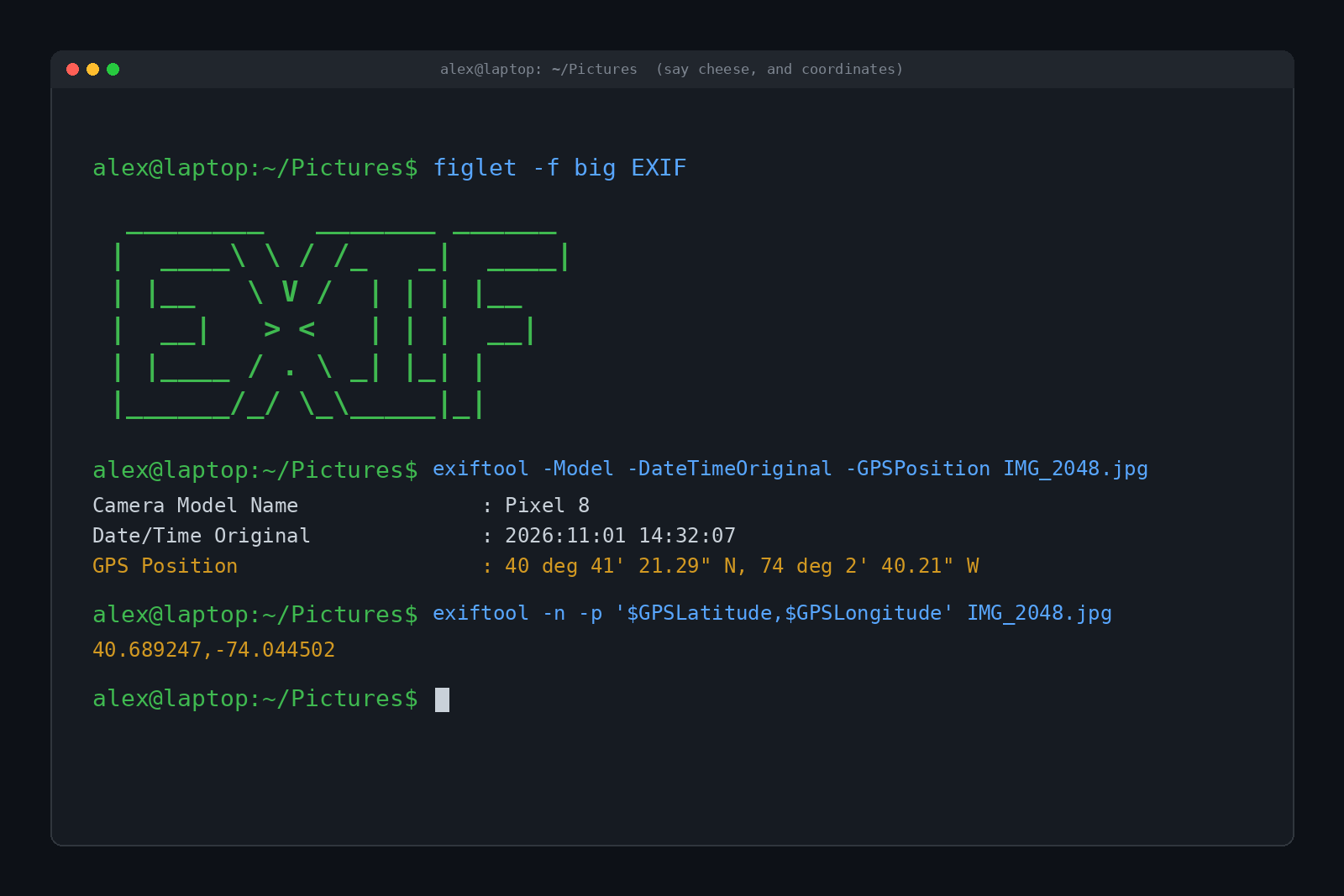
You post a cute photo of your dog in the backyard. Nice lighting, good boy, twelve likes. But could a stranger take that same photo and figure out where your backyard is? Not "somewhere in Ohio." Your actual house?
Short answer: sometimes, yes. Most phone photos carry hidden EXIF data, a little block of information tucked inside the image file that can include the exact GPS coordinates where it was taken, plus the date, time and phone model. Big social networks usually strip that data before anyone else sees it. Texts, emails, AirDrop and "send as file" often don't. The fix takes about ten seconds once you know where the switch is.
So what's actually hiding in your photos, who can see it, and how do you get rid of it? Here's how someone can find your location from a photo, and how to make sure they can't.
What Is EXIF Data?
EXIF stands for Exchangeable Image File Format. It's a standard from the mid 1990s that lets cameras write notes about each shot directly into the image file. Think of it as a sticky note glued to the back of every photo, except the sticky note is invisible unless you go looking for it.
Photographers love it. It's how your photo app knows which lens you used, sorts pictures by date and shows them on a map. A typical phone photo can include:
- The phone's make and model
- The date and time, down to the second
- Camera settings like exposure, aperture and ISO
- Which way the phone was rotated
- GPS coordinates, and sometimes altitude and the direction the camera was facing
That last one is the problem. If your camera app has location access (and most do, because you said yes once during setup), every photo gets geotagged automatically.
Can Someone Find Your Location From a Photo?
If the GPS data survives the trip to them, it's not even hard. No hacking required. Free tools read it in a second.
Here's a test photo we tagged the same way a phone would, then read back with exiftool, a free and very popular metadata reader:
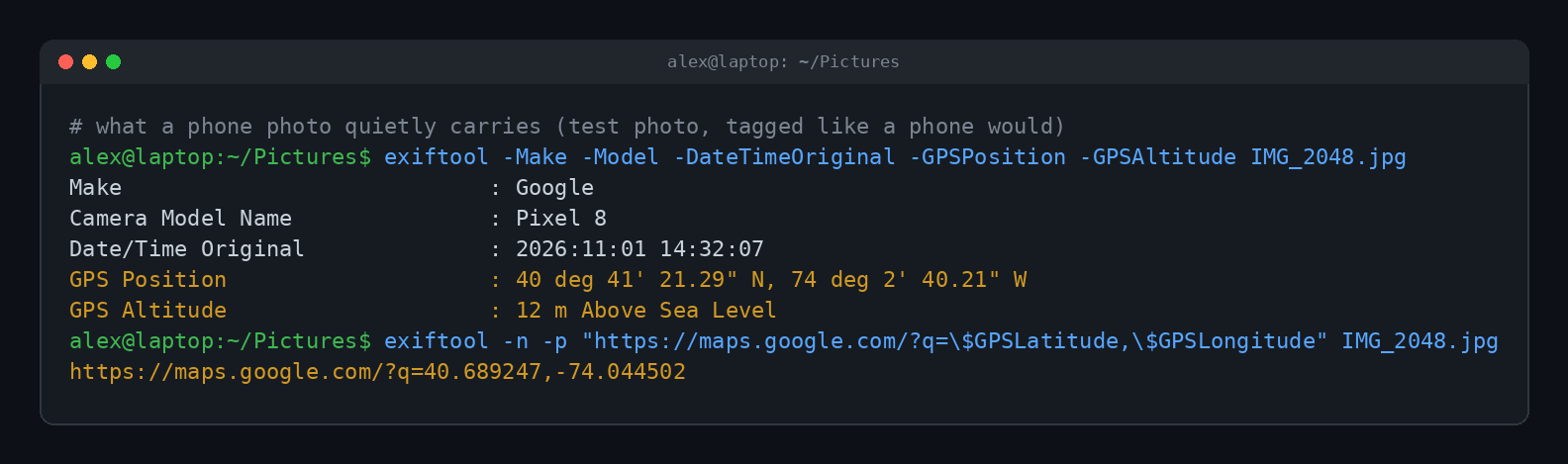
Two commands. The second one turns the coordinates into a Google Maps link. Phone GPS is often accurate to within a few meters, which is more than enough to pick out a specific house on a street.
You don't even need a terminal. On a computer, right-click a photo and open its properties (Windows shows it under Details, a Mac shows it in Preview's Inspector). Plenty of websites will also read a photo's EXIF data if you upload it. Anyone who receives the original file can do this.
The famous example
The best-known case happened in December 2012. Software pioneer John McAfee was on the run from police in Belize, who wanted to question him about his neighbor's death. A Vice reporter traveling with him posted a photo of the two of them. Vice hadn't removed the EXIF data, so readers quickly pulled the GPS coordinates out of the image and pinned it to a property in Guatemala. McAfee later claimed he'd faked the data himself, then changed his story and blamed Vice. Either way, he was arrested in Guatemala within days.
The lesson stuck. Newsrooms, activists and pretty much everyone in security now treat photo metadata as something you scrub before you hit publish.
Which Apps Strip Photo Location?
Here's the good news. Most big public platforms remove EXIF data from photos before showing them to other people, mostly to protect users (and partly so they aren't on the hook when someone gets doxxed). Here's where things stand at the time of writing, based on platform documentation and independent tests:
| Where you share it | Does the recipient get your GPS? |
|---|---|
| Instagram, Facebook, X | No, stripped for viewers |
| Discord, Reddit | No, stripped for viewers |
| Signal | No, metadata is removed |
| WhatsApp (normal photo) | No, stripped |
| WhatsApp or Telegram "send as file / document" | Yes, the original file goes through |
| iMessage and AirDrop | Yes, unless you turn location off first |
| Email attachments | Yes, the original file goes through |
| Cloud links (Drive, Dropbox and similar) | Often yes, depending on the service and settings |
Two big caveats.
First, stripped for viewers isn't the same as deleted. A platform can remove the GPS from the copy everyone sees and still keep it on its own servers. That's a privacy question about the company, not about strangers.
Second, apps change. A setting or a "high quality" upload mode can quietly send the original file. If it matters, strip it yourself before sharing rather than trusting the app.
Google Photos is a nice example of doing it right. Its help pages say location is left out by default when you share a link or an album, unless you choose to include it.
How to Remove Location From Photos
You have two options: stop recording location in the first place, or strip it when you share. Doing both is the safest bet.
On an iPhone
To share a photo without its location:
- Open the photo in Photos and tap the Share button.
- Tap Options near the top of the share sheet.
- Turn off Location. You'll see "Location Not Included" above the Options button.
- Share it however you like.
To stop geotagging new photos entirely, go to Settings, then Privacy & Security, then Location Services, then Camera, and choose Never. You can also wipe the location from a single photo: open its info panel, choose to adjust the location, and pick No Location. (The exact button names shift a little between iOS versions.)
On Android
Every Android brand does it a little differently, but the general moves are:
- Open your Camera app's settings and turn off the option called something like Location tags or Save location.
- Or remove the Camera app's location permission in Settings, under Apps, then Camera, then Permissions.
- In Google Photos, open a photo, swipe up for details, and you can edit or remove its location.
On Windows
Right-click the photo, choose Properties, open the Details tab and click Remove Properties and Personal Information at the bottom. You can either make a clean copy or strip the original. Making a copy is the safer habit.
On a Mac
In the Photos app, select the picture, choose Image from the menu bar, then Location, then Hide Location. When exporting, you can also uncheck the option to include location information.
The command line way
If you're comfortable in a terminal, exiftool can wipe every bit of metadata in one shot. Do it on a copy so your original keeps its details for your own photo library:
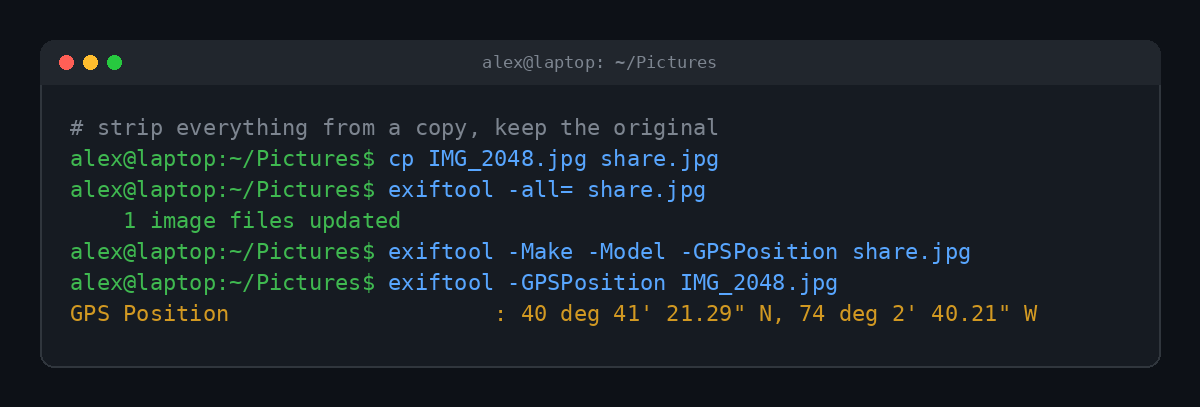
That empty line after the third command is the whole point. No make, no model, no location. The copy is safe to send.
It's Not Just EXIF
Stripping metadata closes the easy door. It doesn't close every door. People who do this for a hobby (it's called OSINT, short for open source intelligence) can often find a location from the picture itself:
- Street signs, house numbers and license plates
- A distinctive skyline, mountain or landmark out the window
- Shop names, school logos and uniforms
- Reflections in windows, sunglasses and even shiny pet bowls
- Sun angle and shadows, which can narrow down time and direction
There's an entire online game, GeoGuessr, built around guessing locations from street-level photos, and top players are scary good at it. So before posting anything from home, give the background a quick once-over too. Google even warns about this in its own help pages: hiding the coordinates doesn't stop viewers from guessing a place from landmarks.
Photos are only one way your location leaks. Your phone's apps are another, which we cover in How Do Hackers Hack Your Phone? And your IP address gives away a rough location to every site you visit, which is part of what we dug into in What Is a VPN and Does It Actually Keep You Anonymous? If you want your browser to tell websites to keep their hands off your data, see What Is Global Privacy Control (GPC)?
Quick Answers
Do screenshots have location data?
Usually not. Screenshots generally don't get GPS tags, though they can still include dates, the device model and anything visible on screen.
Does Instagram show where a photo was taken?
Not from the hidden data. Instagram strips EXIF from what other people see. It only shows a location if you add one to the post yourself.
Can police get location from a photo?
If they have the original file, yes, the same way anyone can. They can also request data a platform kept on its own servers, which is a separate legal process.
Does turning off location remove GPS from old photos?
No. It only stops new photos from being tagged. Older photos keep their coordinates until you remove them or share them with location turned off.
Is it safe to text photos?
To people you trust, sure. Just know that iMessage and many texting apps send the original, location included, unless you switch location off in the share options.
TL;DR
Yes, someone can find your location from a photo if it still has its EXIF data, which can include exact GPS coordinates. Big social networks strip it for viewers, but texts, emails, AirDrop and "send as file" often don't. Turn off location in the share options or the camera settings, strip metadata from anything sensitive, and check the background for street signs before you post.