You hit run and nothing happens. Or something happens, just not the thing you wanted. Every programmer, from day-one beginners to people with decades of experience, spends a huge chunk of their time asking the same question: why doesn't this work?
The good news is that almost every broken program fails for one of three reasons. Once you know which kind of problem you're looking at, it gets a lot easier to fix.
1. Syntax Errors: The Code Isn't Valid
A syntax error means you broke the grammar rules of the programming language. The computer can't even understand what you wrote, so it refuses to run it at all.
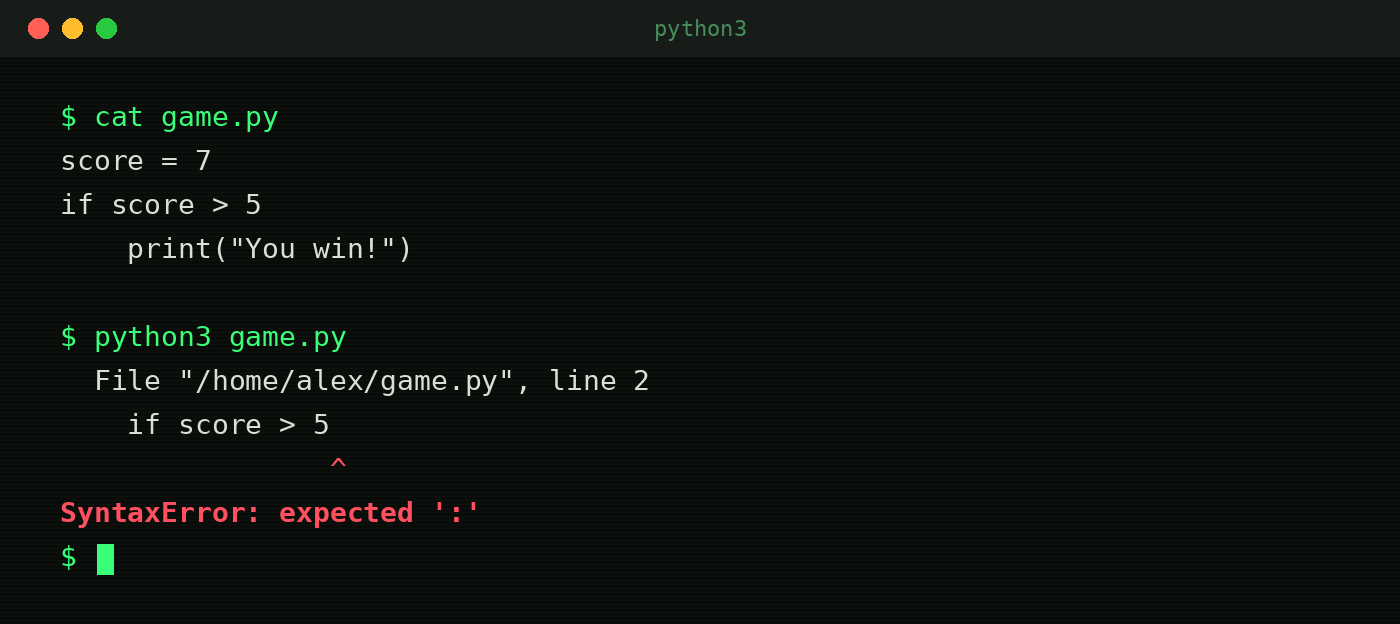
Here's a classic in Python, a missing colon:
if score > 90
    print("Nice work")
Python stops right away with SyntaxError: expected ':'. Other common culprits:
- A missing bracket, parenthesis or quote mark
- A misspelled keyword, like
retruninstead ofreturn - A missing semicolon in languages like JavaScript, C or Java
- Wrong indentation in Python, where spacing actually matters
Syntax errors are the easiest kind to fix, because the error message usually tells you the exact line. Read the whole message, including the line number, before you start guessing. Most code editors also underline these mistakes as you type.
 Server403

2. Logic Errors: The Code Runs, But It's Wrong
A logic error is sneakier. The code is perfectly valid, it runs without complaint, and it gives you the wrong answer. The computer is doing exactly what you told it to. You just told it the wrong thing.
A famous example is the off-by-one error:
scores = [88, 92, 75]
for i in range(1, len(scores)):
    print(scores[i])
This prints 92 and 75, but skips 88, because lists in Python start counting at 0, not 1. No error message, just a quietly wrong result.
Other common logic errors include using > where you meant >=, updating the wrong variable, or doing steps in the wrong order. Because nothing crashes, these can hide for a long time.
3. Environment Problems: "It Works on My Machine"
Sometimes the code is fine and the problem is everything around it. Your program depends on a specific version of a language, a set of libraries, files in certain places, and settings on the computer it runs on. Change any of those and working code can break.
Signs you're dealing with an environment problem:
- Errors like
ModuleNotFoundErroror "command not found" - Code that works on your computer and fails on a coworker's or on a server
- Something that worked yesterday and broke after an update, with no code changes
- File paths or passwords that were hard coded for one machine
The usual fixes are installing the missing package, matching versions with a requirements file, using a virtual environment, or packaging the whole setup in a container with a tool like Docker so it runs the same way everywhere.
 Server403

How to Track Down the Problem
- Read the entire error message. The last line usually says what went wrong, and the lines above it show where.
- Make it happen again on purpose. If you can't reproduce a bug reliably, you can't tell when it's fixed.
- Check what changed. If it worked before, the bug is almost always in whatever you changed since then.
- Print or inspect your values. Add print statements or use your editor's debugger to see what your variables actually contain, not what you assume they contain.
- Shrink the problem. Comment out chunks of code until the bug disappears. The last thing you removed is where it lives.
- Explain it out loud. Programmers call this rubber duck debugging: walk through your code line by line to someone, or to an actual rubber duck. You'll often spot the mistake halfway through the sentence.
- Search the exact error message. Paste it in quotes into a search engine. Someone has almost certainly hit it before.
TL;DR
Broken code nearly always comes down to three things. Syntax errors stop the code from running and usually point to the exact line. Logic errors run fine but give wrong results. Environment problems come from missing packages, wrong versions or machine-specific settings. Read the error, figure out which kind you have, and work through it one step at a time.