ASCII and Unicode both do the same basic job: they give every character a number, so computers can store and share text. The difference is scale. ASCII has 128 characters. Unicode has nearly 160,000, covering almost every writing system on Earth, plus math symbols, ancient scripts and emoji.
Here's how the two are related, why one replaced the other, and what's actually happening when text turns into empty boxes or gibberish.
ASCII in One Minute
ASCII dates back to the 1960s. It uses 7 bits per character, which gives it room for 128 codes: English letters, the digits 0 to 9, punctuation, and a set of invisible control codes like line breaks and tabs. To ASCII, A is 65 and a is 97.
That was plenty for American computers in the 1960s. It was nowhere near enough for the rest of the world.
The Mess Before Unicode
As computers spread, every region needed its own characters. The usual fix was to use the 8th bit that ASCII left unused, which doubled the table to 256 slots. The problem was that everyone filled those extra 128 slots differently. Western Europe had one version, Russia had several, Greece had another, and Japan and China needed thousands of characters and built entirely separate systems.
So the same byte could mean é on one computer and a Cyrillic letter on another. Send a file across a border and it could come out as nonsense. The world needed one table that covered everything.
 Server403
What Unicode Is
Unicode is that one table. The first version came out in 1991, and it gets a new release roughly every year. Each character gets a unique number called a code point, written like U+0041 (that one is A). As of Unicode 17.0, released in September 2025, it has 159,801 characters, and there's room for over a million.
The most important design choice: Unicode's first 128 characters are exactly ASCII. A is still 65, a line break is still 10. Every ASCII file is automatically valid Unicode, which is a big part of why the switch worked.
Unicode vs UTF-8: Not the Same Thing
This trips a lot of people up. Unicode is the list of characters and their numbers. UTF-8 is one way of storing those numbers as bytes. There are others, like UTF-16 (used inside Windows and Java) and UTF-32, but UTF-8 won.
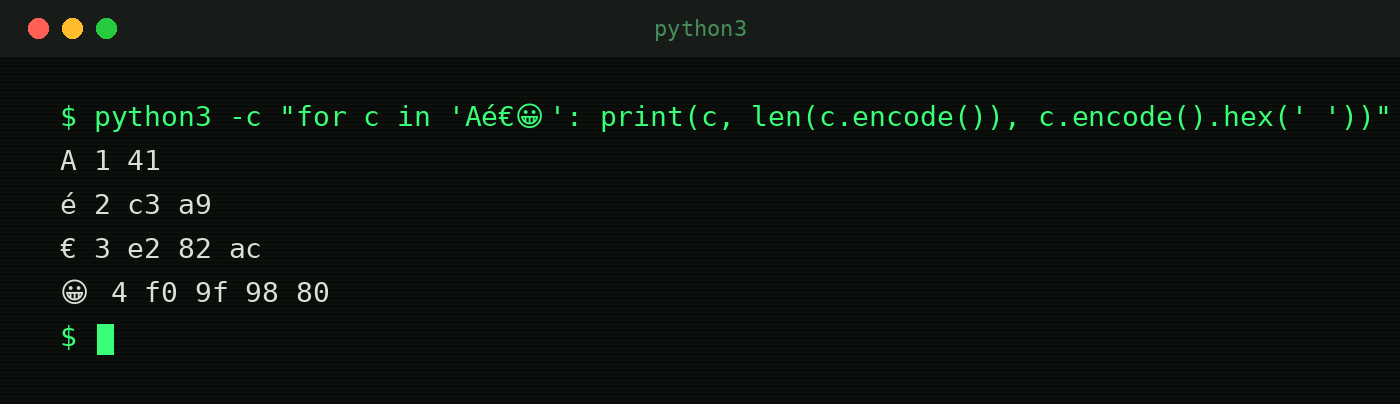
UTF-8 uses a variable number of bytes per character:
- 1 byte for anything in ASCII, so plain English text is exactly the same size as before
- 2 bytes for most European, Greek, Cyrillic, Hebrew and Arabic letters
- 3 bytes for most Chinese, Japanese and Korean characters
- 4 bytes for emoji and rarer characters
Because it's fully backward compatible with ASCII and doesn't waste space on English text, UTF-8 became the default almost everywhere. Today almost every website uses it.
Why Text Turns Into Boxes or Gibberish
Two different things go wrong, and they look different.
Empty boxes (sometimes called "tofu") mean the computer knows exactly which character it's supposed to show, but the font doesn't have a picture for it. You see this with brand-new emoji on older phones, or rare scripts on a system without the right font. The text is fine. The font just can't draw it.
Gibberish like "café" instead of "café" has a name: mojibake, from Japanese for "character transformation." It happens when text saved in one encoding is read as another. Here, UTF-8 bytes for é are being read as an old Western European encoding, so one character turns into two wrong ones. The fix is opening or saving the file with the right encoding, which these days almost always means UTF-8.
 Server403
ASCII vs Unicode at a Glance
- Size: ASCII has 128 characters. Unicode has 159,801 and counting.
- Languages: ASCII covers English. Unicode covers nearly every living language and many dead ones.
- Emoji: ASCII has none. Unicode has thousands.
- Storage: ASCII uses one byte per character. Unicode's UTF-8 uses one to four.
- Compatibility: every ASCII file is already valid UTF-8.
Which One Should You Use?
If you're saving files, building a website or writing code, use UTF-8. It handles every language, it's the web's standard, and it reads plain ASCII text perfectly. The only time you'd deliberately stick to pure ASCII is talking to old systems or hardware that can't handle anything else.
TL;DR
ASCII is the original 128-character table for English text. Unicode is the modern table that covers almost every language and emoji, with nearly 160,000 characters and growing. Unicode includes ASCII as its first 128 characters, and UTF-8 is the way most of the world stores Unicode today. Boxes mean a missing font. Gibberish means the wrong encoding.